Add Tips on the final bill and maybe custom receipts
Answered
Hie all i am glad to be part of a community that is working hard to produce a wonderful and very efficient software. my request is aligned with creating a Tips/Gratuity button on the payment screen that allows waiters to add their Tips/Gratuity on the final bill and also a feature that keeps track of the tips/gratuity.
-
Official comment

Hi,
Thanks for the request.
There is a workaround to use Tips/Gratuity right now by adding new service item and set it as a "free" price (option "Price changed allowed").
Products marked as "service" does not affect stock quantities, while option "Price changed allowed" allows you to enter the tip amount every time.
Here is a detailed instructions how to achieve the functionality mentioned above.
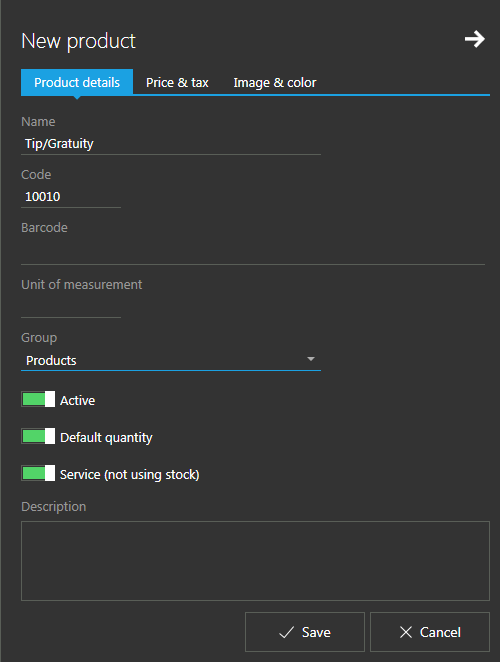
Add new product named "Tips/Gratuity" (or any other convenient name for your market) to your products. Make sure that "Service (not using stock)" option is enabled.
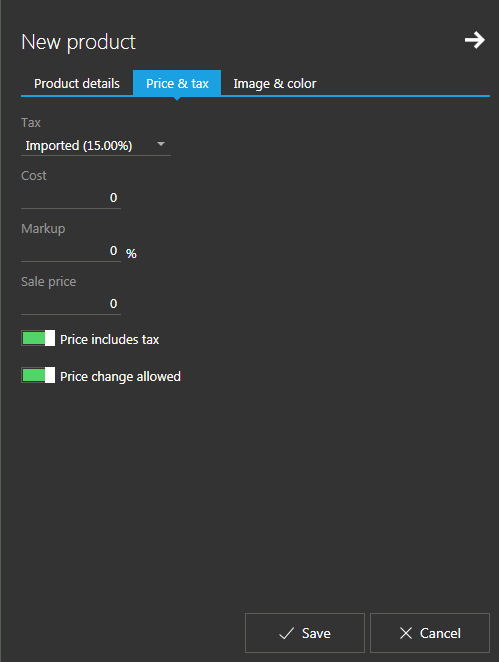
Enable "Price change allowed" option for that product too, like on the picture below. With this option enabled, user is presented with a dialog asking him to enter the "price" before item is added to the current sale.
User will now be able to add this product to each bill with tip / gratuity amount.
In reports section, you can see turnover for this product for each user.
We hope this helps.
Comment actions

Please sign in to leave a comment.
Comments
2 comments