User Name Be Included In The Printed Receipt or Invoice

Completed

Comments

14 comments

  • Official comment
    Avatar
    Aronium Support

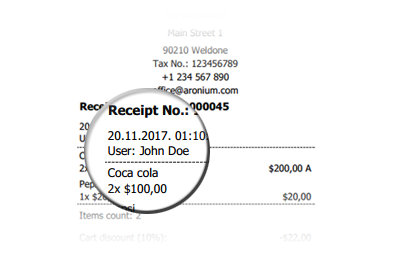
    This feature is available with version 1.16. Cashier name is printed on top of the receipt.
    Comment actions Permalink
  • Avatar
    Karau Dan

    It will be of great help if included

    0
    Comment actions Permalink
  • Avatar
    Aronium Support

    Hi,

    This feature is accepted and will be added in version 1.16. User first and last name will be printed in receipt.

    Thanks, Aronium team.

    1
    Comment actions Permalink
  • Avatar
    Franklin

    Oh thank you so much...

    0
    Comment actions Permalink
  • Avatar
    kateb arcorp

    Indeed, it's a great addition.

    0
    Comment actions Permalink
  • Avatar
    Xumahill

    Am using Version 1.23.2.0 and i cant find this feature or is it hidden some where?

    0
    Comment actions Permalink
  • Avatar
    Aronium Support

    HI Xumahill,

    User name is printed in receipt only, not invoice (A4). If you need this on invoice, please open a support ticket and we'll be able to provide custom invoice (A4) template with user name printed.

    Thanks, Aronium team.

    0
    Comment actions Permalink
  • Avatar
    jenerose simpia

    hi

    can we change the price sign from dollar to philippine peso?


    thanks.!

    0
    Comment actions Permalink
  • Avatar
    Xumahill

    @Jenerose, Yes you can!


    First make sure your set your computer to the desired Currency symbol ( under control panel). 


    Login to your Aronium POS, Under the SETTINGS, PRINT OPTIONS, CUSTOMIZE RECEIPT, USE SYSTEM CURRENCY FORMAT (slide in this option to Right). 

    Success!


    0
    Comment actions Permalink
  • Avatar
    jenerose simpia

    i already set it in philippine peso but why my receipt still shows dollar sign?

    0
    Comment actions Permalink
  • Avatar
    Xumahill

    Login to your Aronium POS, Under the SETTINGS, PRINT OPTIONS, CUSTOMIZE RECEIPT, USE SYSTEM CURRENCY FORMAT (slide in this option to Right). and make sure your click on SAVE down there. See below print screen.

    0
    Comment actions Permalink
  • Avatar
    jenerose simpia

    thank you.its ok now

    0
    Comment actions Permalink
  • Avatar
    Angus Alapati

    Hi , The latest 1.46.0.2 doesn't print USER in the INVOICE part using PRO version. Pls adviced

    0
    Comment actions Permalink
  • Avatar
    Aronium Support

    Hi Angus,

    This request was for receipt, not for A4 invoice.

    We are planning to user to A4 invoices in one of the future updates.

    Thanks, Aronium team.

    0
    Comment actions Permalink

Please sign in to leave a comment.