Sales history report, export in Excel or CSV
Completed
First of all, thanks you for your software, easy to use and full functional.
Please I have seen all reports already availble, but I need additional info when I export sales report of the day.
Your standard report are perfect to extract already grouped infos, but please I need a sales history detialed with each sell with day and hours of the sell itself.
Your "Sales History" could be perfect, but it is only on video, with no option to export: it as all rows with all data I need, to analize sells by my external Excel file.
On the other hand, I cannot find a report on "Management -> Reporting" to fit my needs who have the same "simple" data in row and column, without groups, subgroups, sums and so on..
The most close to my needs colud be "Hourly sales by product groups", but it is already groped by row and columns, with sums, so it will be really hard to use in other analisys Excel file.
Thanks you so much if you can follow this message.
ML
-

I agree, all reports should be available in Excel or .csv format.
And also, the rounding function (well described here) is really needed. Both Canada and Australia years ago stopped using pennies (1¢) for cash transactions. So while credit/debit/e-Transfer payments are still to the penny, all cash transactions are rounded – by the cash register – to the nearest 5¢. So Aronium should do this too, to assist both with correctly showing the cashier what change to pay the customer, and also so the tracking of the expected cash in the cash drawer is correct.
-

Hi Massimiliano,
This report is available with version 1.44. You can find Item list report in Management > Reporting, under Sales section.
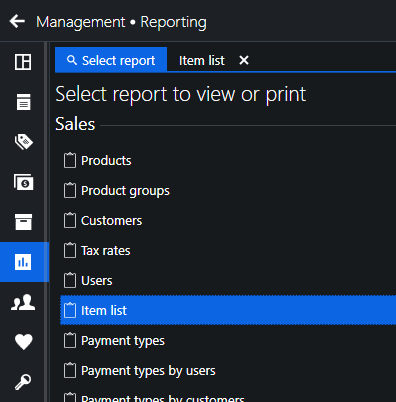
You can manually download the latest version from our download page or you can wait for the automatic update, we will be releasing it gradually over the course of next few days.
Thank you for your patience, Aronium team.
Please sign in to leave a comment.
Comments
2 comments