Add SKU or code to the purchase form for the supplier

Hello, it's a pleasure to meet you. I wanted to tell you that I have an store and I'm trying out your sales system and it seems great to me. I've encountered a problem that I would like your help with. When generating a purchase to replenish inventory, I realized that, in the preview of the document, the code or SKU of the product to be purchased does not appear, and that is a bit inconvenient when giving the request to the supplier, since he will not find the requested product if he does not have the SKU code on the order sheet. I hope you can help me find the option to activate the column when printing the document for the supplier. If the solution is not found, it would not be bad if you added the option to view the SKU or code for purchases from suppliers. Thank you, I'll be attentive.
ESP: Hola, Quería comentarles que tengo una tienda y estoy probando su sistema de ventas y me parece genial. Me he encontrado con un problema que me gustaría que me ayudaran. Al generar una compra para reponer inventario, me di cuenta que, en la vista previa del documento, no aparece el código o SKU del producto a comprar, y eso es un poco incómodo al momento de dar la solicitud al proveedor, ya que no encontrará el producto solicitado si no tiene el código SKU en la hoja de pedido. Espero me puedan ayudar a encontrar la opción para activar la columna al momento de imprimir el documento para el proveedor. Si no se encuentra la solución, no estaría mal que agregaran la opción de visualizar el SKU o código para compras a proveedores. Gracias, estaré atento.
-

Hi, Here is a modified template that includes Product SKU with it name. Hope it helps!
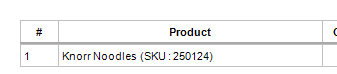
Replace the file in C:\Program Files\Aronium\Templates\Ltr\
https://mega.nz/file/s0xiFRCS#K-XRW-L73tGP_iFXEBTXrAPatMQyyEGhCzxdOycqj00
-
Thank you for your help, but this is not what I'm looking for. The idea is that we don't have to edit the 1,500 items one by one. Your solution would be if there are less than 20 items. In my case, I work with an importer that requests an inventory update and recount on a weekly basis, and it's easier to make a purchase and print it. The printout should already show the SKU code, but it doesn't. Only the name appears, and the name is supplied by the importer. I use that as my guide. I hope you understand my request. The idea is to make it easier for the importer to search for the product using the SKU code, as this makes it more specific. Thank you for your help.


Please sign in to leave a comment.
Comments
4 comments