Quick user switching
Answered
Hi Team,
I would like to request a feature where there should be option on the sales screen to quickly switch between different users so any staff can quickly switch by authenticating their password and manage their individual sales. Currently, application must be restarted to switch the user.
Keep up the great work team!
Regards,
Zia
-

Hi Zia,
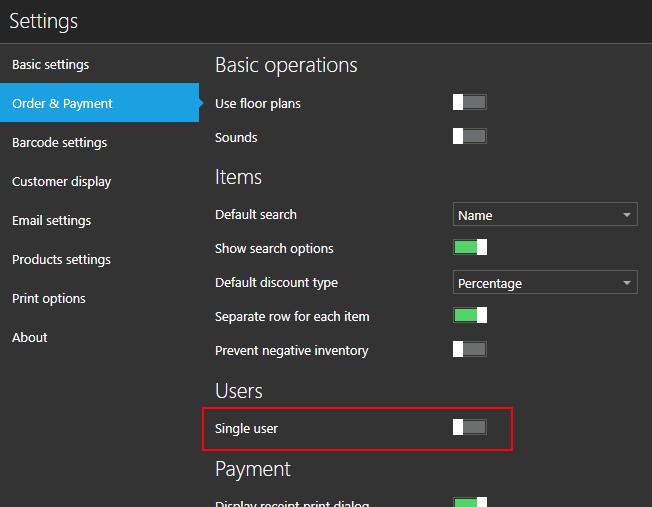
You do not need to restart application in order to change user. Aronium has a "multi user" mode, mostly used in bars and restaurants where multiple users / waiters are using POS application. With this mode enabled, user is logged out after each sale, or when current order is saved (via F9 button).
To enable multi user mode, all you have to do is turn "Single user" off in settings, as displayed in screenshot below.
Sing out from main menu
Also, even without "multi user" mode, you have an option to sign out from main flyout menu, as displayed in screenshot below.

Please let us know if this works for you.
Best regards, Aronium team.
-
Dear Team,
Thank you for the information, it will work, but if a button could be added in a future release on the sales screen, that would be great, as signing out automatically after every sale could be a problem sometimes if the same user needs to perform multiple transactions.
Regards,
Zia
-

Hi
seems tricky. I just tried by "Single User" OFF. The moment I finished one sale, and press "Done", its signing out, for next user to sign-in. and if same user sitting at the counter for long time like retail store, I don't this feature is used. I think there is a bit improvement needed, so that even if it is multi user environment, but if it is made in a way that, the user should purposefully logout by just a button, on sales screen directly, so that another user can log-in or he himself would come back to login. Hope I am giving a clear picture. May be there is a way to do so, instead of Flyout menu.?
Thanks to Aronium.
-
Hi KKM,
What you experienced is by design, that option ("Single user" OFF) is made for restaurants and bars, where many cashiers (waiters) uses a POS all the time, and it needs to be "locked".
In a situation you described, where a user is sitting at the counter for a long time (regular retail store), I suggest you use "Single user" option turned ON.
Once user has finished his shift, or another user wants to use counter instead of him, you can open Flyout menu and click "Sign out", as described above.Best regards, Aronium team.
-

Hello
I have just downloaded Aronium to try it for a pub that I am taking over soon. I have to say that for the most part it is amazing.
However, I can see what's being said here because I simulated a busy Friday night when I have two team members working with me. Having each one logged out and then have to enter their password after every sale would be extremely time consuming for the team member especially when there's a massive queue of customers wanting to get drunk!
Would it be possible to have a setup whereby multiple users can log in once and then when a new sale is started, the team member clicks their name and adds products to their sale. While they are serving, another team member comes along, clicks his/her name and starts a new order and when the first team member comes back to either take payment or check the order, they click their name.
That would be a very efficient method of switching users without them having to enter their password every time after a sale.
Hope this helps
Paul
-

yes really this option is important,
option 1 : A dropdown box in main screen that can select user name and he/she can continue sale. (the sales details have to add in particular user sales individually . (once select user name have to ask password or in setting there should be a option password enable/disable), (master password for Admin/ sub admin/ all user)
Option 2: a short cut key for sign in to next user (change the user)
Please sign in to leave a comment.
Comments
6 comments