Difficulty in Adding new Products-directly or through .csv file
Answered
Hi
Today was a hard day for me. I created a .csv file with lots of products and barcodes. and wanted to add quantities as well, as per one sample .csv file. But it did show error in validating the import file, and it only validated when i removed the Quantity column. Anyway, i thought, let me first upload the file without Quantities.
Then though it accepted the file, it almost deleted earlier products (some are still intact) and replaced with products in the imported file. OOH... i dont know what was wrong. But when i tested such imprting a file with just two or three dummy products, it worked OK and appended the test products. With that confidence when i imported this real large list, i did replaced old products.
What to do? is there any way to retrive previous ones?
and what is the exact process to append the new products by importing? and i wish to add quantities in each purchase so that it adds to the stock.
regards
-

Hi KKM,
When importing products, it is looking for existing ones by code first and then by name.
So, if the product with the same code exists, it will be updated. If product with code cannot be found, it will try to find the product by name. If existing product is found, it will be updated, otherwise, new product is created.
We cannot help much without actual CSV you tried to import, I suggest you send your CSV to support@aronium com or create new support request and upload your CSV so we can investigate what may be causing this issue.
-
Hi
Thanks for the reply to make me understand.
as i mentioned, I could upload the products, when i removed the quantity, but could not locate many new products. But while i again tried with the import through Advanced tab option, there is a column wise validation check for the .csv file. Which is very helpful for understanding the error, if any in each column. I could finally uploaded the products.
However, have some associated queries:
1. the quantity is not the same as i uploaded, either its more or less in many cases, and in very few cases its as per my imported quantity. Why so?
2. how to update the quantity of a product, through .csv file, if i got a new batch of same product, so that it will add to previous quantity.
Regards
KKM
-
Hi KKM,
Here are the answers:
1. the quantity is not the same as i uploaded, either its more or less in many cases, and in very few cases its as per my imported quantity. Why so?
Importing quantities with CSV will create a purchase document, meaning that these quantities will be added to existing ones.
You can check what is causing current quantity on stock by looking at "Stock history", you will see all changes for a particular product there.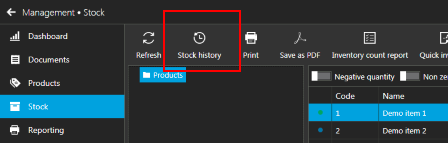
2. how to update the quantity of a product, through .csv file, if i got a new batch of same product, so that it will add to previous quantity.
Similar to my previous answer, when you enter quantities in CSV, a purchase document will be created. So, for example, if your current stock quantity is 10, and you enter 5 in CSV, after import, you will have 15 on stock.
Hope this helps.
-
Hi
Now i practiced it a while and understood.
1. If now, i need to update the previously wrong stock value, then i did a "Quick Inventory" option and updated a latest value. This action, creating another document of only this updated stock value. by this way for so many product stock updates, it created as many such new documents. is this not increasing the volume (number) of documents?
somehow, i feel this kind of many documents creation is not required, instead a sort 'log' file data can be created at back end and only the latest stock only shows at any time, unless we really want to see how we reached the current stock level. i.e. as good as the History option.
Regards
-
Hi KKM,
As mentioned before, stock is calculated based on documents, so there must be a document to track stock change.
What you should do, instead of creating "Quick inventory" for each item, in case you have multiple items you wish to add to document, create a single "Inventory count" and add all of your items to that document. The result will be the same, only you will have a single document instead of multiple ones create using "Quick inventory"
You can find instructions how to create inventory count at https://help.aronium.com/hc/en-us/articles/115001110085-Inventory-count.
Hope this helps.
Regards, Aronium team.
Please sign in to leave a comment.
Comments
5 comments