Stock getting negative even after quick inventory correction

hi
i was having problem with product importing thro' .csv file, which you had explained before. Its fine. but now, i corrected all stock values using the feature of "qucik inventory" option for all products through checking each product count, (luckily we are just starting the store, and relatively less number products, though currently 180 , still counting),
Now, the problem, is, when i sold a product which was corrected thro' Quick Inventory option, hence forth its showing as -ve.
see the picture for stock history of a product below:
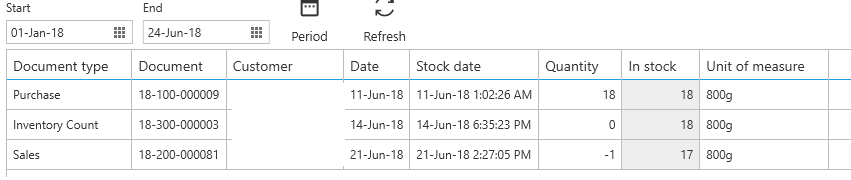
now if i go for selling this product:the message comes as below:
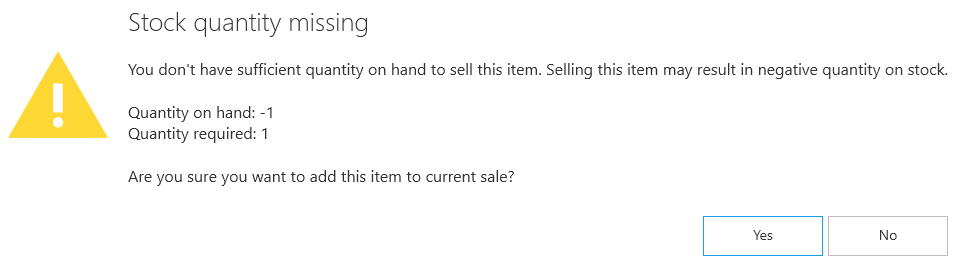 its logical as the Quantity it shows above as -1, but where as "in stock" its 17 numbers.
also checked in product search through POS thro' F3 option and displays as below.:

so, what is the problem? and am i doing wrong way of inventory update?
-

Hi KKM,
We have tried to reproduce this following your instructions and screenshot, but without luck.
I would like you to try couple of things.
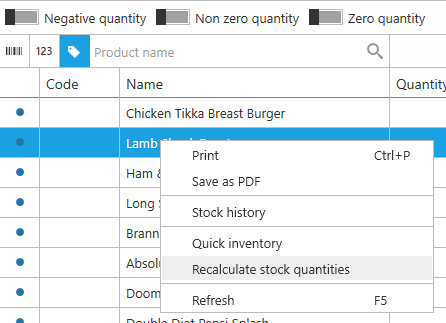
Recalculate stock quantities
Go to "Management / Stock", right click anywhere in the grid and select "Recalculate stock quantities". This will check for quantities in documents and will make sure that final quantity on stock is correct.
Documents in the future
In case previous step still gives you quantity -1 for your item, than you need to check for documents made in the future.
Stock history gives you report for selected date range, it may be possible that you have created a document on some date in the future, so it is not displayed there by default.
Change date range in documents or stock history to include dates in the future (e.g. 12/31/2020) and try searching for this period again. If there are documents created in the future, this should show them.
If none of this happens, please reach out to support at support@aronium.com or create a support ticket and send us a copy of your database so we can investigate this further.
Thanks, Aronium team.
-
hi
thanks for the reply.
i tried your way of recalculating. then i tried with two other products. its showed same error for one, but not the other.
please tell me
1. What is the "Quantity" in stock history?
2. do i need to "recalculate" for all products independently now, as i changed many of stock through "Qucik inventory"?
-
Stock history displays stock changes via documents. "Quantity" column refers to quantity in a document, while "In stock" refers to quantity after quantity from document has been applied. The value of "In stock" in the last row of stock history gives you current stock quantity.
To update multiple items using inventory count, do not use "Quick inventory", use "Inventory count" document, as described at https://help.aronium.com/hc/en-us/articles/115001110085-Inventory-count.
The result is the same, only that quick inventory creates a single document for each item.Running "Recalculate stock quantities" as described above will recalculate all items automatically.
If you are not able to figure out why this issue occurs, please, send us a copy of your database via support ticket or to support@aronium.com, that is the fastest way to checkout what is the reason for this behavior.
Please sign in to leave a comment.
Comments
4 comments