Central Server
Answered
Hi,
Is it possible to get a central server to push product's and price updates out? We look after a small Vaping shop who want a decent till system and this hits the spot but instead of me spending 3 hours (1 hour on each till) updating it can we push the changes across?
-
Official comment

Hi Alex,
Networking version is currently in private BETA and EAP (Early Adopters Program) users are already using it.
All users who joins this program are provided with an extended trial license (minimum three months for the start), until networking version is publicly released, so, this way, they can start using it now and will earn some extra free-of-charge period.
On the other hand, we hope EAP users will provide some valuable feedback, which is one of the most important things to us.
Estimated price for networking version is going to be $10/month, once BETA ends and it becomes publicly available.
If you wish to join early adopters, please let us know, we'll be glad to send you an invitation with download link and instructions how to set it up.
Best regards, Aronium team.
Comment actions -
Hi Alex,
Of course, thank you for joining!
We'll send you an invitation with instructions and download link shortly, if you have any questions or troubles setting it up, feel free to reach out to support@aronium.com anytime.
-

Hi. Very nice product we have here. I was to setup for a client until I realized it could not work in a multi-user environment. I would really love to test the Network version so I can recommend it to my next client. Wonderful user-experience and a great interface it has. Kindly share with me details of the BETA version for testing. Thanks!
-
Hi Billy,
If you have successfully installed database at server PC (DESKTOP-3C81AKU), you do not need to install database again on a client (second) PC, just skip this step. It will connect to DESKTOP-3C81AKU\ARONIUM server.
I believe these instructions exists in PDF document you've received, please check it out.
So, install Aronium on second PC, skip this step (close this application, you do not need to create database, you've already did it), and run Aronium. Once you start Aronium, you will be asked for database server and database name, these steps can be found in instructions sent, too.
I hope this helps. If you still have any troubles setting up network environment, please let us know.
Thanks, Aronium team.
-
Hi Billy,
There is a notes plugin that adds a button to the print dialog screen, like in the screenshot below.
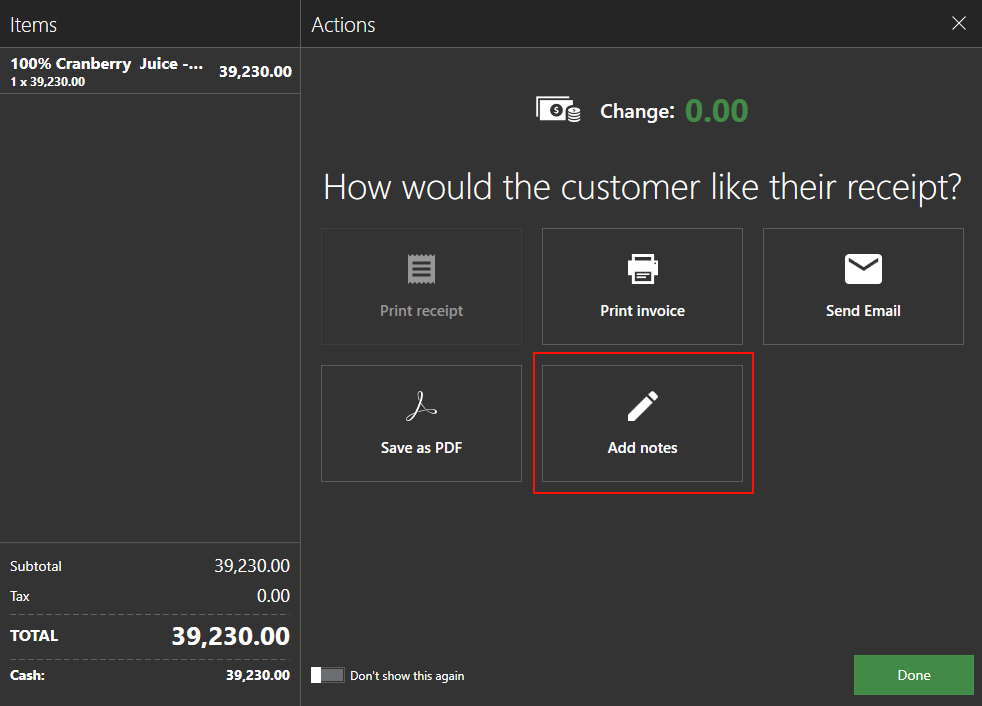
Unfortunately, it doesn't work with networking version, but it is planned to make it available for networking version, too. This plugin allows you to enter public notes that can be printed later in receipt.
If you don't mind, I will create a support ticket on behalf of you, so you can discuss this further with support and check when you can expect this plugin to be ready. I hope this is not a blocker for you.
Thanks, Aronium team.
-
Hi Alex,
There are still things to do before it is ready for public, mostly on the server side, so application itself is functional at this stage as well.
As soon as we are certain of some dates, we'll publicly announce it.As you already know, anyone can join BETA at this stage, and free license will be provided. Also, we will make sure to provide additional free trial for all EAP users, if required, so no businesses are affected due to a expiring license in this period.
-
Hi Billy,
As Aronium is native Windows application, it can be used on Windows 10 tablets (we have used it on Surface PRO).
If you are willing to make it work, please make sure that tablet supports standard Windows applications. For example, you will not be able to install and run it on Surface RT, as is does not allows standard Windows apps to be installed due to different architecture.
Ability to run Aronium on Android or iPad is currently not planned, even if we would like to have that support in the future, that requires a lot of work, so we cannot promise this in near future.
Thanks, Aronium team.


Please sign in to leave a comment.
Comments
17 comments