Stocktaking

Is there any such action as Stock Taking. So a way to print out a report of all or some of the items with count levels so a stock count can be performed.
I would like to be able to do progressive counting of stock to ensure what I have on the self is what I have in Aronium.
-

Hi Pete,
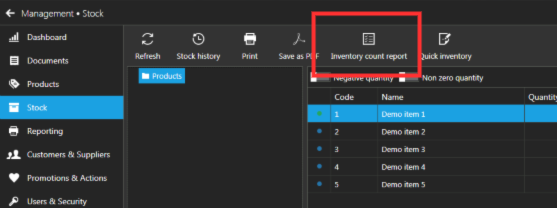
There is a "Inventory count report" in Stock section. It is made to help checking quantities on shelf against expected ones.
Please, try it out and see if that works for you.
-
Ok thats a starting point.
and I see that there is a Excel output option ( not shown in your image above.)
Some errors opening the excel spread sheet which I will get back to you about, however is there any way to have it sorted in some way.
not sure what way it is sorted now.. Seems all over the place.
Thanks -
Hi Pete,
Export to Excel will save current stock values, it will not print that "Inventory count report". Even they are similar, "Inventory count report" can probably help when counting your quantities in shelves.
We will double check sorting for sure, but it would be helpful if you can tell us what report were you looking ("Stock quantities" or "Inventory count report") so we can investigate and make necessary improvements to the templates.
Thanks, Aronium team.
-
I guess with the Excel Spreadsheet, it doesn't include the 'Group' If it did I could sort that on many levels.
With the PDF (Inventory Count Report) it also doesn't have the "Group" but doesn't seem to be sorted in any order.
And I couldn't do anything with it except count stock
So maybe the Excel Spread Sheet would be great if it could include at least the Group column then as mentioned I could sort it anyway. An option to have all columns would be good, or just include them and I could remove or sort by any.
I am not sure if anyone else uses this for stocktaking, but maybe later a way to upload the new spreadsheet and fix all quantities at once. ( I would hope there were not too many errors in quantity mismatches, but with more stock there could be.
My application is in a shop ( natural Therapies, like crystals and healings and everything to go with that), so at this stage we are smallish, but aiming to increase stocks quite a bit
The more I get into this program the more it is such a great option for so many.
I really think if you put a small fee for it (After a trial run of a simple version) then some money coming your way would help enhance this greatly. -
Hi Pete,
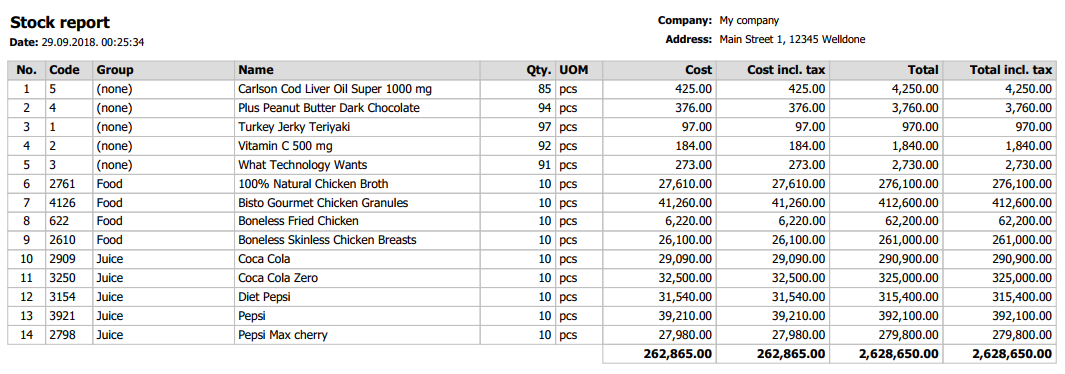
Thanks for bringing this up, you suggestion is accepted! We have added product group column and sort by product group name first, then by product name.
Report will look similar to the one below.
Now, regarding that sale price, that is something that we need to think of and find the right way to do it, if it is going to be added. Next update comes with ability to set multiple tax rates on a product, with combination of percent and fixed taxes, so it is becoming a bit more complex.
If we wish to print sale price, we would need to calculate it before, so it brings another level of complexity to this report, and that is the reason why we are not including it now.
However, If more users are asking for this, we'll be glad to consider adding sale price column in the future, too. Until then, I am sure we can work something out, if you still need that column in report, we could make a custom report for you after 1.23 is released.However, we hope that this minor improvement will be helpful to you and other users.
Thanks, Bosko
-
Version 1.23 is currently in testing phase, and we hope it will be released until October 15th, if everything goes by the plan.
If you haven't already, subscribe to our newsletter, as we will send an announcement once it is released, so you don't miss it.
Thanks, Aronium team.
-

I've modified the "Inventory Count Report" template for my own use, mine now looks like this (with test data):

It's sorted by group name then product name and doesn't show products that are set as "Service". Long group names and products with multiple barcodes won't display properly, but I don't need that.
-
Hi Ash,
Nice work!
IMPORTANT NOTE: MOVE YOUR CUSTOM TEMPLATE OUT OF "TEMPLATES" DIRECTORY SO IT IS NOT OVERWRITTEN DURING UPDATE.
To make sure your custom template doesn't get replaced on next update, you should move it to "C:\Program files\Aronium\Templates\user" directory (create that "user" directory there if it doesn't exists). This way, Aronium will always look for templates in "user" directory first, and it will be used regardless of default template existence.
Thanks, Aronium team.
-
Thanks, I was quite pleased when I figured out how to edit them, it's obviously not something that many users are going to be able to do, but makes Aronium even more attractive for advanced users.
I thought there must be a way of separating custom templates but hadn't figured that bit out yet. So thanks for the tip, that's very useful :)
-

Am I correct that the latest version is out?
I checked the Stock Report above and it seems only the last part of the Group is displayed.
So instead of Products/Crystals/ClearQuartz/Bag
all the report shows is Bag.
If bag is under several Product Groups then again they are hard to find to tell which one it is actually refering to on the shelf unless we refer back to Aronium itself..
( or we would have to print out the products.csv as wellIt would be beneficial if all ( maybe not Products/ ) of the group was shown
Even a report like the inventory count report that can be saved as an Excel file with the whole Group and qty's etc??
-
Hi Pete,
Yes, we agree it would be great to have full group name (path) when printing reports, but it is kind of "expensive" operation to do, as we would need to go recursively up the tree for each group to collect parent group names (if it is possible at all using some simple script).
Other solution would be to store full path in a group every time you create / update a product group, but that requires some additional work and we cannot promise that at this moment.
However, we will consider this for the future and will keep in mind your observation, so, if we find an effective way to do this, we will, but, please, don't expect this to be done any soon.
Thanks, Aronium team.
-
Hi Admin 1,
It was quite a while ago that I did this, and I didn't end up using Aronium much.
I remember I had to modify an SQL query near the top of the file to get the barcode data. Then modify the table template to add the new column, adjusting the size of the other columns to fit.Here's the report template that I ended up with, but it may not work with the current version of Aronium. If you compare it with the default report template you may be able to figure out what needs to be changed.
<?xml version="1.0" encoding="utf-8"?>
<inherited BaseReport="..\base\Base.frx" ScriptLanguage="CSharp" ReportInfo.Created="01/01/2017 13:59:09" ReportInfo.Modified="09/29/2018 00:46:37" ReportInfo.CreatorVersion="2018.4.0.0">
<Dictionary>
<SQLiteDataConnection Name="Connection" ConnectionString="rijcmlqIltkgxALMArhJ2W63qXqy9mHFxj3jszzPRFpX1ii4uTuch5qPIB4cGrB4iECYGs+zdGXqlEPX4zFY4oZokjGzFC/++UQ0S7HrISGyaXTcf4nW9PV+rbalsw8kKP+K9U/">
<TableDataSource Name="Company" DataType="System.Int32" Enabled="true" TableName="Company" SelectCommand="SELECT C.Id, C.Name, C.Address, C.PostalCode, C.City, C.TaxNumber, C.Email, C.PhoneNumber, C1.Name AS Country FROM `Company` C INNER JOIN `Country` C1 ON C.CountryId = C1.Id ">
<Column Name="Id" DataType="System.Int64"/>
<Column Name="Name" DataType="System.String"/>
<Column Name="Address" DataType="System.String"/>
<Column Name="PostalCode" DataType="System.String"/>
<Column Name="City" DataType="System.String"/>
<Column Name="TaxNumber" DataType="System.String"/>
<Column Name="Email" DataType="System.String"/>
<Column Name="PhoneNumber" DataType="System.String"/>
<Column Name="Country" DataType="System.String"/>
</TableDataSource>
<TableDataSource Name="Table" Alias="Items" DataType="System.Int32" Enabled="true" SelectCommand="SELECT G.Name AS GrName, P.Name, B.Value AS Barcode, P.Price, P.MeasurementUnit, IFNULL(S.Quantity,0) AS Quantity FROM Product AS P LEFT JOIN Stock S ON S.ProductId = P.Id LEFT JOIN Barcode B ON B.ProductId = P.Id LEFT JOIN ProductGroup G ON G.Id = P.ProductGroupId WHERE P.IsService = 0 AND P.IsEnabled = 1 ORDER BY GrName,P.Name ">
<Column Name="GrName" DataType="System.String"/>
<Column Name="Name" DataType="System.String"/>
<Column Name="Barcode" DataType="System.String"/>
<Column Name="Price" DataType="System.Decimal"/>
<Column Name="MeasurementUnit" DataType="System.String"/>
<Column Name="Quantity" DataType="System.Object"/>
</TableDataSource>
</SQLiteDataConnection>
</Dictionary>
<inherited Name="Page1" Guides="434.7,699.3,340.2,0,330.75,415.8,529.2,623.7,718.2,302.4">
<inherited Name="ReportTitle1" Guides="0,18.9,37.8,56.7,75.6">
<inherited Name="txtCompanyName"/>
<inherited Name="txtCompanyAddress"/>
<inherited Name="txtCity"/>
<inherited Name="txtCountry"/>
<inherited Name="lblCompany"/>
<inherited Name="lblAddress"/>
<TextObject Name="Text0" ZOrder="6" Width="330.75" Height="18.9" Text="Inventory count report" VertAlign="Center" Font="Tahoma, 16pt, style=Bold"/>
</inherited>
<inherited Name="PageHeader1" Top="88.62" Height="18.9" Fill.Color="Gainsboro" Guides="0,18.9">
<TextObject Name="Text15" ZOrder="0" Width="107.9" Height="18.9" Border.Lines="All" Border.Color="Silver" Text="Group" VertAlign="Center" Font="Tahoma, 8pt, style=Bold"/>
<TextObject Name="Text2" ZOrder="1" Left="107.9" Width="255.8" Height="18.9" Border.Lines="All" Border.Color="Silver" Text="Product name" VertAlign="Center" Font="Tahoma, 8pt, style=Bold"/>
<TextObject Name="Text9" ZOrder="2" Left="363.7" Width="95" Height="18.9" Border.Lines="All" Border.Color="Silver" Text="Barcode" VertAlign="Center" Font="Tahoma, 8pt, style=Bold"/>
<TextObject Name="Text4" ZOrder="3" Left="458.7" Width="45" Height="18.9" Border.Lines="All" Border.Color="Silver" Text="UoM" VertAlign="Center" Font="Tahoma, 8pt, style=Bold"/>
<TextObject Name="Text11" ZOrder="4" Left="503.7" Width="60" Height="18.9" Border.Lines="All" Border.Color="Silver" Text="Price" VertAlign="Center" Font="Tahoma, 8pt, style=Bold"/>
<TextObject Name="Text6" ZOrder="5" Left="563.7" Width="70" Height="18.9" Border.Lines="All" Border.Color="Silver" Text="Expected" VertAlign="Center" Font="Tahoma, 8pt, style=Bold"/>
<TextObject Name="Text7" ZOrder="6" Left="633.7" Width="84.5" Height="18.9" Border.Lines="All" Border.Color="Silver" Text="Counted" VertAlign="Center" Font="Tahoma, 8pt, style=Bold"/>
</inherited>
<inherited Name="Data1" Top="111.09" Height="18.9" Guides="0,18.9" DataSource="Table">
<TextObject Name="Text16" ZOrder="0" Width="107.9" Height="18.9" Border.Lines="All" Border.Color="Silver" Text="[Items.GrName]" VertAlign="Center" Font="Tahoma, 8pt"/>
<TextObject Name="Text1" ZOrder="1" Left="107.9" Width="255.8" Height="18.9" Border.Lines="All" Border.Color="Silver" Text="[Items.Name]" VertAlign="Center" Font="Tahoma, 8pt"/>
<TextObject Name="Text10" ZOrder="2" Left="363.7" Width="95" Height="18.9" Border.Lines="All" Border.Color="Silver" Text="[Items.Barcode]" VertAlign="Center" Font="Tahoma, 8pt"/>
<TextObject Name="Text3" ZOrder="3" Left="458.7" Width="45" Height="18.9" Border.Lines="All" Border.Color="Silver" Text="[Items.MeasurementUnit]" VertAlign="Center" Font="Tahoma, 8pt"/>
<TextObject Name="Text12" ZOrder="4" Left="503.7" Width="60" Height="18.9" Border.Lines="All" Border.Color="Silver" Text="[Items.Price]" Format="Currency" Format.UseLocale="true" HorzAlign="Right" VertAlign="Center" Font="Tahoma, 8pt"/>
<TextObject Name="Text5" ZOrder="5" Left="563.7" Width="70" Height="18.9" Border.Lines="All" Border.Color="Silver" Text="[Items.Quantity]" Format="Number" Format.UseLocale="false" Format.DecimalDigits="2" Format.DecimalSeparator="." Format.GroupSeparator="," Format.NegativePattern="1" HorzAlign="Right" VertAlign="Center" Font="Tahoma, 8pt"/>
<TextObject Name="Text8" ZOrder="6" Left="633.7" Width="84.5" Height="18.9" Border.Lines="All" Border.Color="Silver" VertAlign="Center" Font="Tahoma, 8pt"/>
</inherited>
<inherited Name="PageFooter1" Top="133.56" Guides="0,18.9">
<TextObject Name="Text13" ZOrder="0" Left="623.7" Width="94.5" Height="18.9" Text="Page [Page]" HorzAlign="Right" VertAlign="Center" Font="Tahoma, 8pt"/>
<TextObject Name="Text14" ZOrder="1" Width="302.4" Height="18.9" Text="[Date]" Format="Date" Format.Format="F" VertAlign="Center" Font="Tahoma, 8pt"/>
</inherited>
</inherited>
</inherited>

Please sign in to leave a comment.
Comments
19 comments