Printing Comments/Notes On Customer Receipts
Answered
I manage an overnight parking lot, so for my business, I need to put how many nights the customer pays for and what nights those are. An example would be something like:
Paid 1/12/2018 - 1/14/2018
on the customer's receipt so the customer can stick their receipt on their car's dash and I can tell if people are overstaying their paid dates by going around and checking everyone's receipts. The easiest way I can think of doing this is by printing comments or notes on customer receipts, but unfortunately, I cannot seem to find any option to enable this. If there is some way to enable comment printing on receipts, please someone let me know as it would be extremely helpful.
Thanks in advance!
-Jack
-

Hi Thomas,
You can download notes plugin from https://www.aronium.com/en/features/notes
Best regards, Aronium team
-

Hi Aronium Team,
Your responses has been great working with requests etc.
A question for the notes plugin: does it also leaves notes in the system or only on the receipt?
In my case i need to take notes of sales, for example why a cart or item discount was given on a sale.
And would like to review this at the monthly report.
At the moment we print an extra receipt and manually wrote down for our archive, but it's not very handy..THanks,
H -
Hi Londobali,
Yes, notes added via notes plugin will stay in the system, so you can see them later.
Please keep in mind there are two types of notes, "Private" and "Public" notes. "Public" notes are printed in receipt and invoice, while "Private" ones are visible in document section only. So, if you wish to take note only, without printing it in receipt, you can use "Private note" for this.
However, if you wish to print it on a receipt copy, you can consider the following:
- Make sale
- Print receipt for customer without notes
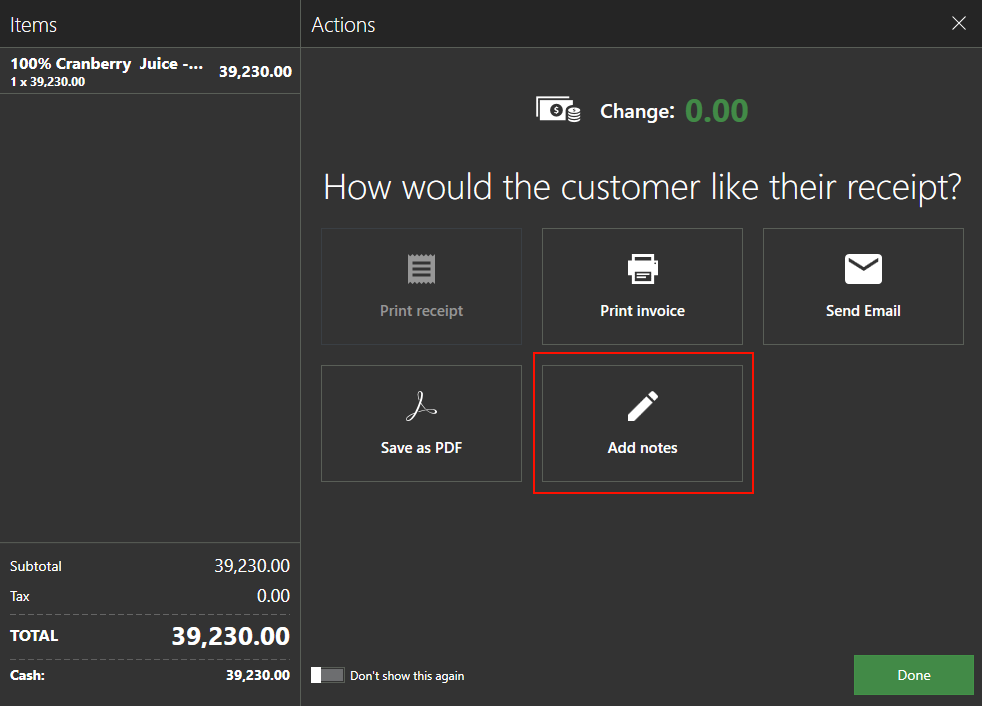
- Without leaving "Print dialog" screen, click "Notes" to add public note
- Print receipt again with notes printed in receipt copy.
Hope this helps.
Thanks, Aronium team.


Please sign in to leave a comment.
Comments
7 comments