Long barcodes

Hi all and thanks for the brilliant software i am implementing this at where work problem is some of our products have 19 digit barcode when the software imports or exports the barcode it changes the last 4 digits to 0000 for example 6336950888167134915 becomes 6336950888167130000 i know I can re can the barcode later but as i have a few like this it will be a pain
Any Ideas
Glen
-

Hi Glen,
When you export products from Aronium, they should be written as they are, no matter if they ends with zeros or not, they are treated as simple text.
You can check that if you open CSV file in notepad, you will see that barcodes are exported as-is.
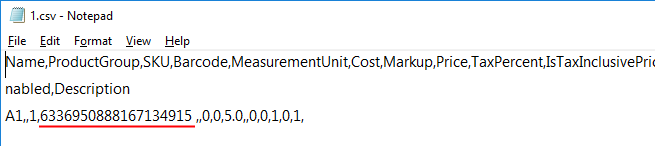
The problem may be in Excel or Google Drive (whatever editor you are using). What you need to do is make sure that barcode column is not treated as number, but as simple text, as editors like Excel are "smart" and trying to convert values to number, and that may be the problem.
Here is the example of formatting column using Google Sheets.
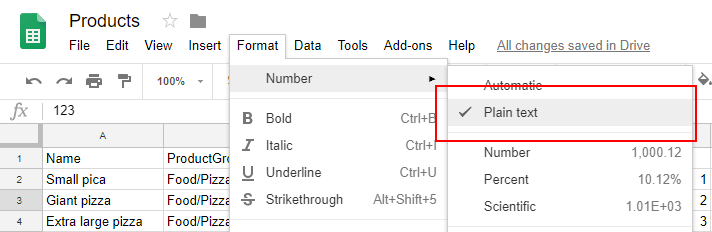
Hope this helps. If you are experiencing different results then we did while testing this, please let us know.
Thanks, Aronium team.
Please sign in to leave a comment.
Comments
2 comments