Wrong inventory
Answered
Hi all,
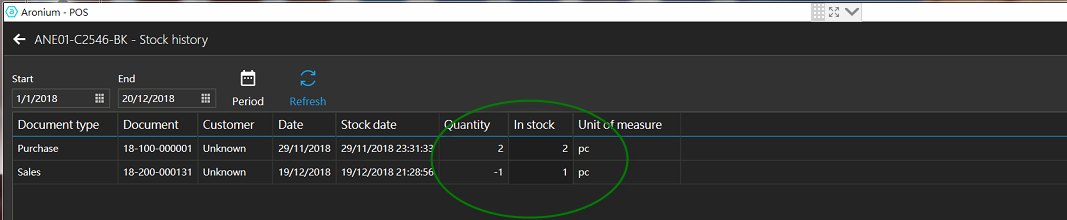
We just purchases 2pcs and sold 1pc after. the invenrtoy should be 1. However, when we check the stock, the QTY is 0. May i know what is the problem?
Roy

-

Hi Roy,
Can you please double check if this item is marked as "Service"? All products marked as "service" will not update stock, as they cannot be counted, like for example, renting a bike or similar.
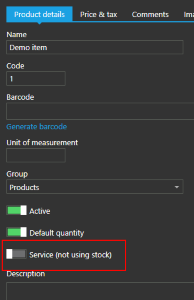
If it is, make sure this option is turned off. Once you have turned it off, go back to "Stock" section, right click anywhere in the grid and select "Recalculate stock quantities", as in the screenshot below.

Please let us know if this worked for you.
Thanks, Aronium team.
-
Hi Roy,
We're glad it worked, thanks for the update.
Stock does updates automatically. The reason why you need to recalculate stock quantities is when you change some product from "service" item to regular item only, as past sales / purchases of this item are already done.
It may be a good idea to recalculate item's stock quantities automatically when you turn on/off this "Service" option on some product, but these are rear situations and "Recalculate stock quantities" option will fix it in no time.
Thanks, Aronium team.

Please sign in to leave a comment.
Comments
6 comments