58mm Thermal Printer

Having real issues with my 58mm unbranded USB thermal printer. Was purchased 3 years ago with cash drawer, touch screen monitor, and a windows 7 PC. Worked fine with Unicenta & Chromis but when the old computers died, replaced them with mini PC's running windows 10.
Have followed all the setup info in Aronium and this is where I am at....
If using POS58 receipt is not scrolling up far enough and I have to feed aprox 20mm at the end. Occasionally it will shift the whole receipt 10mm to the right cutting off the right hand side.
If using ESC/POS then the £ symbol is not printing (it prints a #) and the receipt prints very slow but it prints the correct length and adds the extra 20mm at the end..
I have tried various drivers and they all produce exactly the same results. I have added margin to the bottom when using POS58 but has no effect. I have tried putting space/carriage returns in the footer box but that has no effect either.
Any thoughts? Or even a driver you have working?
Kind regards, Jim
-

Hi Jim,
The reason why printing using Windows driver (used by "POS 58/80" printer type) is that it prints standard Windows print job, like printing a bitmap, while, on the other hand, ESC/POS sends commands for each line.
The reason why special characters are not printed is because it requires handling different code pages separately. There are some partial implementations available, and one of them is £ symbol using ESC/POS. What you have to do is set "Character set" option in printer settings, as in the screenshot below.
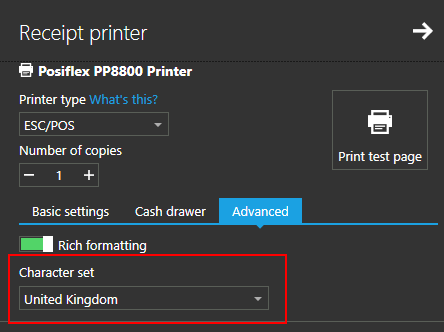
Setting this option as above worked for printers we have in our lab, but it may not work for you, as it may depend on printer itself.
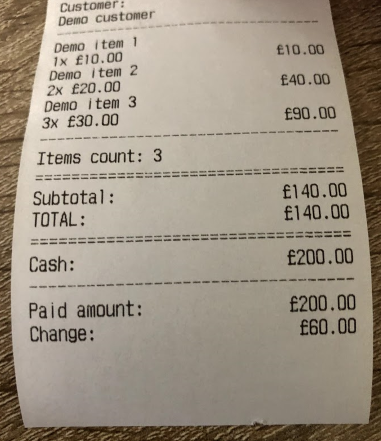
Hope this helps.
Thanks, Aronium team.
Please sign in to leave a comment.
Comments
2 comments