Issues with Currency Rounding and Cash Details on Printed Receipt

Hi Aronium Support Team,
I am using Aronium Lite for my retail shop and need help with two issues regarding my receipts:
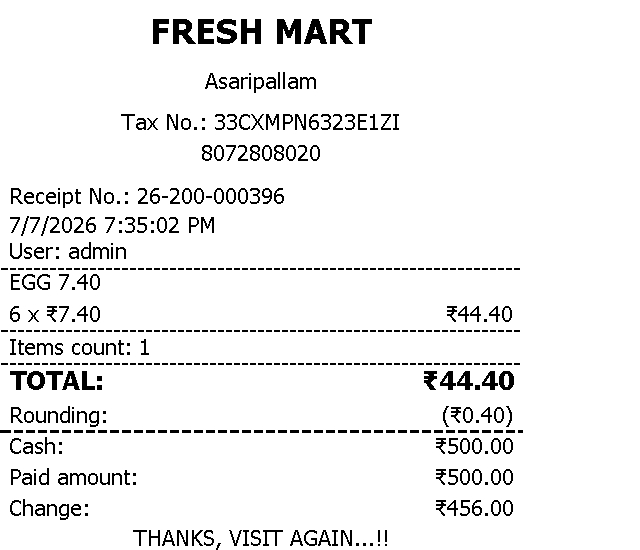
Main TOTAL Rounding: I have enabled cash rounding to 1.00 (Nearest) in my settings. However, it only updates the "Rounding" and "Change" rows at the bottom. The main "TOTAL:" row still displays the unrounded value (e.g., ₹54.40). I want the main TOTAL line itself to display the rounded amount (e.g., TOTAL: ₹54.00).
Missing Payment Details: Even though I enter the received cash amount (e.g., ₹100.00) during the transaction, the printed receipt does not show the "Cash" amount or the "Paid amount" clearly in some cases. Could you please let me know how to ensure the "Cash" and "Paid amount" are always printed on the receipt?
Please guide me on how to fix these settings in Aronium Lite. I have attached sample receipts showing the current layout for your reference.
Regards,
Fresh Mart
-

Hi Biju,
Thank you for the detailed explanation.
This behavior is expected. Cash rounding in Aronium is applied to the payment amount, not to the main invoice total.
The
TOTALline represents the actual sale total calculated from products, discounts, and taxes. For this reason, it remains unchanged, for example:TOTAL: ₹54.40When cash rounding is enabled, Aronium applies the rounding only when the sale is paid with a payment type that has rounding enabled. The rounding is shown separately, for example:
TOTAL:        ₹54.40
Rounding:     -₹0.40
Cash:         ₹54.00
Paid amount:  ₹54.00
This is intentional because changing the main
TOTALline would also change the meaning of the invoice total and could affect tax and sales reporting. Rounding is treated as a payment adjustment, while the invoice total remains the exact sale amount.In short:
-
TOTALshows the original sale total. -
Roundingshows the adjustment. -
Cashshows the rounded amount paid with cash. -
Paid amountshows the actual paid amount. - Product prices, taxes, and invoice total are not changed by rounding.
For your second question, the
CashandPaid amountlines should be printed when the receipt contains payments. If your receipt does not show the cash / payment rows, please share the example so we can see it. Also, please remember that re-printed receipts will not show the change, but the payment types and paid amount should be included.Regards,
Aronium Team -
Please sign in to leave a comment.
Comments
1 comment