Receipt Print Output Problem (58mm)
Answered
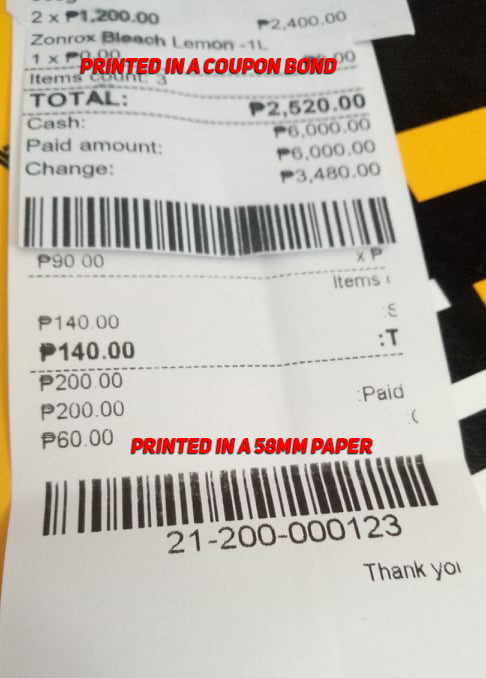
Hi, I am using Xprinter XP-58IIH Thermal Printer as my Receipt printer. I have some issues with the receipt output (The image below shows the sides are cut, even when the margin is zero). I tried adjusting font size and the margins yet it always cut on the sides. I'm wondering how could I fix the problem? Thank you so much.
I tried printing the reciept in a letter size bond paper using epson l220 and it shows no problem. (The comparison is seen in the attached image) Thank you so much.
-

Hi Jabee,
Many printers have some hard margins. Let's say your paper size is 58 mm and you have selected "POS 58" printer type, it still can happen that paper width is actually not fully printable due to hard margins.
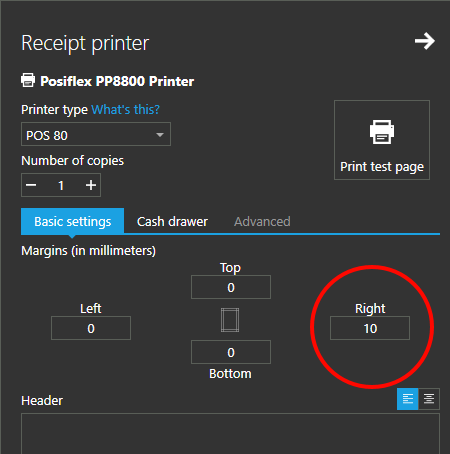
So, all you have to do is to adjust the margins in settings, as described here. Set or change a value for right margin until you are satisfied with the results, as in the screenshot below.
Thanks, Aronium team.
Please sign in to leave a comment.
Comments
2 comments