Reorder limit

-

Hi Mohammad,
The easiest way would be to install Stock control plugin from https://www.aronium.com/en/features/stock-control, if you haven't already.
Once you have it installed, go to Management > Products and select Export and export products to CSV (Excel). Open the file with Excel (or Google Drive) and you will see the additional columns like:
- Supplier
- Reorder point
- Preferred quantity
- Low stock warning and
- Warning quantity
Change the products you wish by entering a desired reorder point and import CSV back by following instructions at https://help.aronium.com/hc/en-us/articles/115000981491-Import-products-using-CSV.
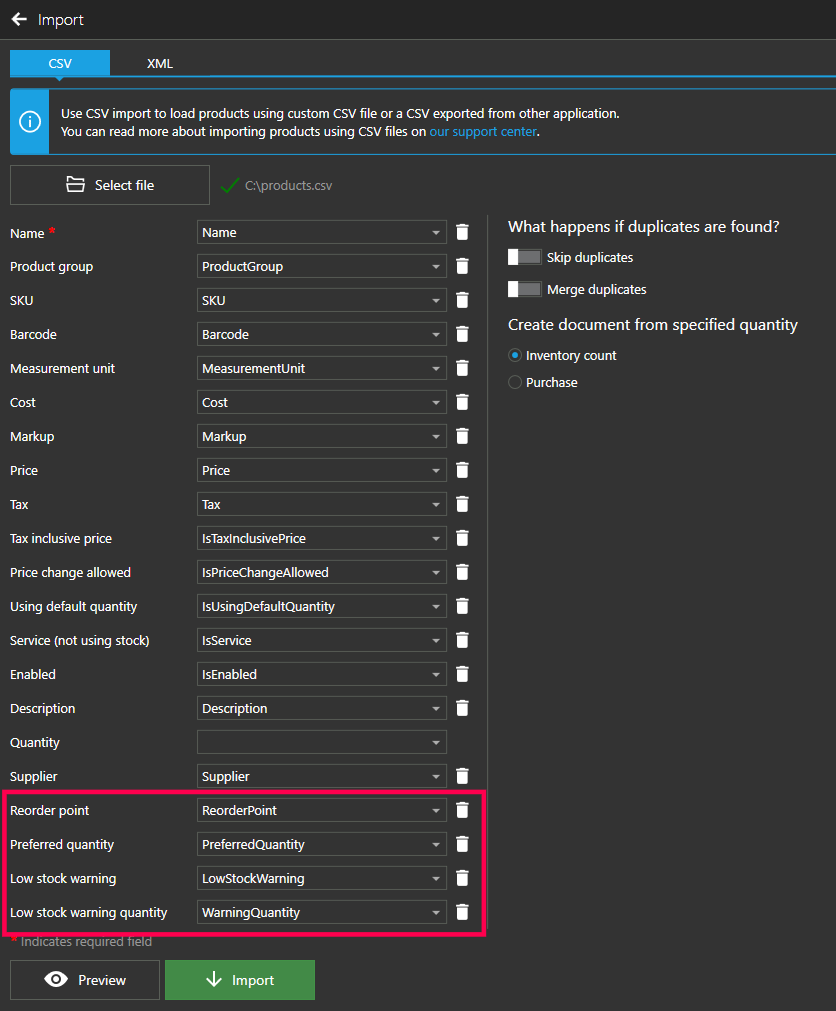
Once in the import screen, make sure that Stock control's fields are mapped correctly and continue to products import, and your reorder points will be updated accordingly.
Hope this helps.
Thanks, Aronium team.
Please sign in to leave a comment.
Comments
1 comment