calculate vat
Answered
Hi, I have a problem with calculating the VAT
when I add 15% is wrong to calculate VAT
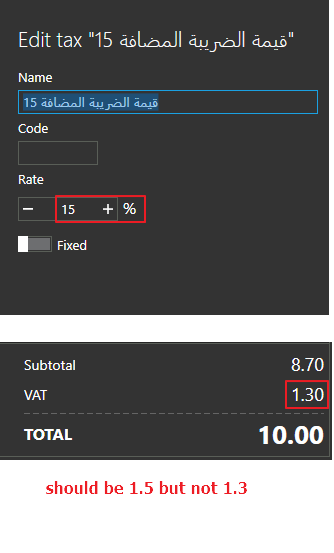
Please help me :(
-

Hi Moharykat
Please double check your math, there is no error in the VAT (Value Added Tax) calculation.
If you want to reverse calculate the amount without tax you need to use the following formula.
Price without VAT = Price with VAT / (1 + (VAT rate/100))
So your example will be:
Price without VAT = 10 / 1.15= 8.7
You can find more explanations on the web:
https://vatcalconline.com
https://www.translatorscafe.com/unit-converter/zh-CN/calculator/vat/Best regards, Aronium team
-

Hello Moharykat.
I think you get it wrong. Let me make it simpler or easier to do... When calculating the price without VAT, utilize the formula: Price without VAT=Price with VAT1+(VAT rate/100) For instance, with a price of 10 and a VAT rate of 15%, the result is 8.7.
You can use many VAT calculator for this on web like this calculator.
-

i agree with john son
When calculating the price without VAT, use the following formula:
Price without VAT = Price with VAT / (1 + (VAT rate / 100))
For example, if the price with VAT is 120 and the VAT rate is 20%, the result is 100.
You can use this VAT calculators available online..
Please sign in to leave a comment.
Comments
3 comments