Orders counter
Answered
Dear friends, first of all I hope you have an excellent new year 2023 and I wish the best for you, your family and friends. I am using Aronium in my store and I realized that the counter of the orders is reinitialized to 1 in the transition from 2022 to 2023. My question is: Is there any way to make it continue with the sequence of the orders from one year to another?, because the order numbers apear duplicated and that is a problem for me. Thank you in advance for your reply.
Best regards,
Henry
-

Hi Henry,
Yes, you can change the counter by yourself.
Go to Settings > Print options > Customize receipt, find Receipt counter and click on it. It will change to the input field so you can enter the current counter from where document number should continue counting.
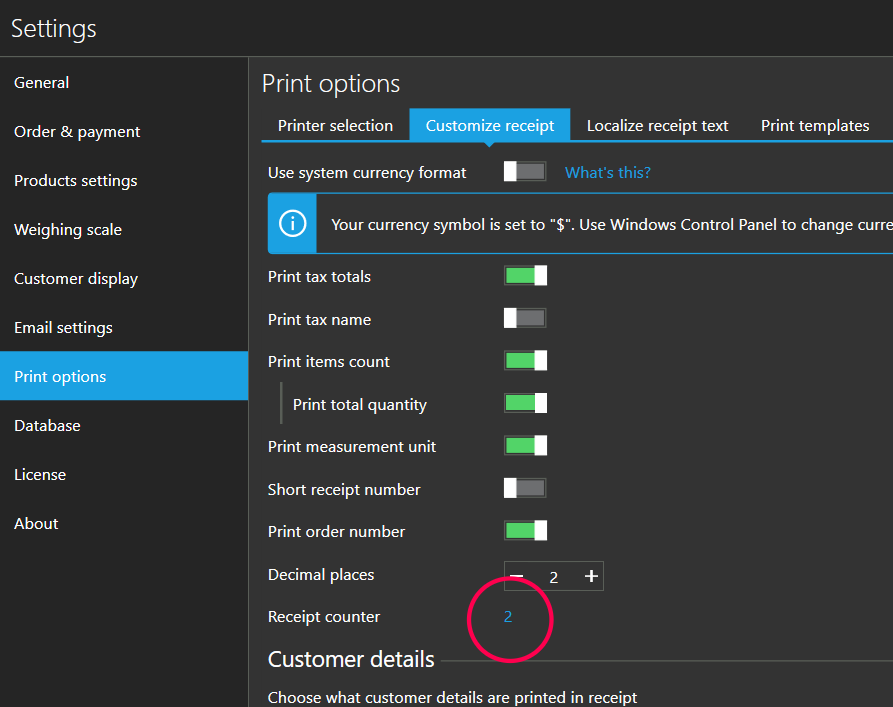
Please remember that the value there represents last created document number (not the next one). For example, if you change the counter value to "100", the next document number will be "101".
You can find more info about this topic at https://help.aronium.com/hc/en-us/articles/115003418212-Customize-receipt.
Thanks, Aronium team.
Please sign in to leave a comment.
Comments
1 comment