Print Receipt
Answered
-

Hi,
This should be already available via "locked sale" option. You are able to print a "receipt preview" on "Lock sale" action. This way, customer can see the order and can choose payment type before transaction is closed.
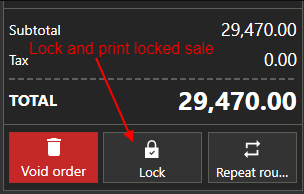
Also, if you need to split a receipt, you can do it via:
- Selecting rounds for print
- Splitting order
You can select which rounds will be used for receipt in payment screen (see more info at https://help.aronium.com/hc/en-us/articles/209524645-Payment).
This way, you are able to close only selected rounds creating a separate transaction and printing a separate receipt for each order round.If you wish to split a order into multiple orders or to transfer to different user / cashier, you can use "Transfer" option.
Best regards, Aronium team.
-

We really enjoy using your POS Software for our business however, we have one request which is to please a button labeled Retrieve Order which will let all Users(Cashiers,etc.) retrieve orders when customers bring the printed receipts from our Servers to our POS Counter to pay for their order(s) as the Transfer Button doesn't work for our business as for safety reasons our Servers can't know our Cashiers,etc. or anyone that runs our POS Register passwords. We would like to please also ask that you please fix it so that have time you have to do a Void Order Transaction that it doesn't automatically "kick the cash drawer open as it does now & that you also please fix it on the Parked Receipts only that where the word User is that it is able to please be changed to Server(or whatever someone else needs to change it to for their business) so that the word Server & the name and/or initials of the Server will print out. We ask that you please make these changes as soon as possible. Thanks and Have a very Blessed Day. Thanks, HPGFD&B Mgmt. Team


Please sign in to leave a comment.
Comments
6 comments