Ticket number / invoice
Completed
I discovered these days this pos system, I currently have another in use also free open source, which I have been using in my business for more than a year but yours, my attention was called by the simple and practical interface
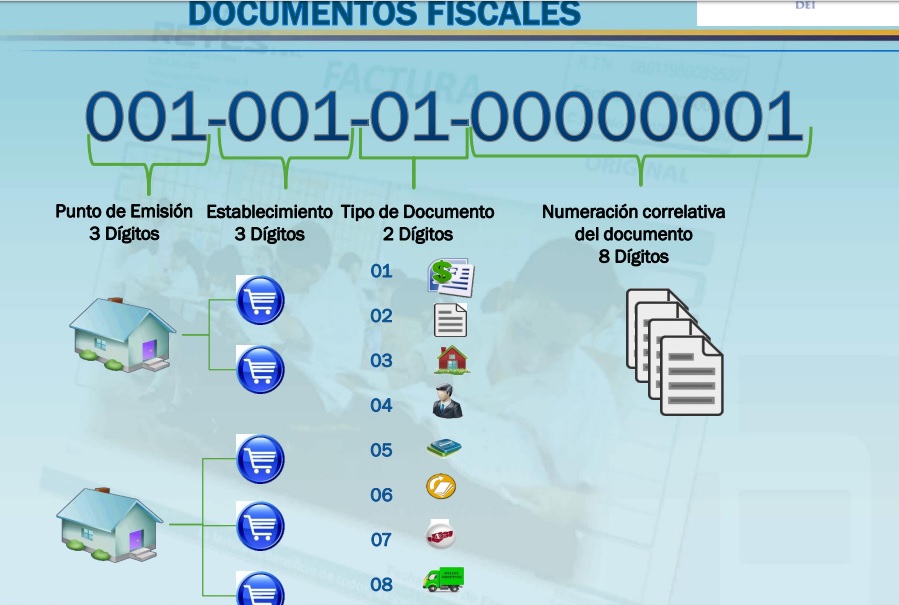
Now here in Colombia as in many countries of America the government, establishes as mandatory the system of consecutive numbering of invoices and has a different format than the one used by its system that is so
invoice number: 17-2000-xxxxxx here according to the activity and type of tax registration can be numeric or alphanumeric example
invoice number: A01-0000001 or invoice number: 00000001 there is some possibility of modifying that function .-
-

Hi Enrique,
Thank you for the feature request.
Document number consists of the following: <YEAR>-<DOCUMENT_TYPE>-<DOCUMENT_NUMBER>, meaning that, for example 17-200-000123, represents the following:
- 17 - 2017 year
- 200 - document type (in this case it is "Sales")
- 000123 - document number
Using this numeration you are able to see what the document is by simply looking at the document number, like
- 100 - Purchase
- 120 - Stock return
- 200 - Sales
- 220 - Refund
- 300 - Inventory count
What we discussed internally, is to provide a way to simplify this number on customer facing documents (receipts, invoices,...), so instead of "17-200-000123" Aronium prints e.g. "000123" or just "123".
Along with this, it makes sense to allow users to enter a prefix. Again, we are considering this for printing only, not entirely changing the numeration in the system.
However, we are open for discussions, so, if this request gets enough votes, we will be happy to add improvements on this field.
Thanks, Aronium team.
-
I was also thinking about another detail that is important because this function
is the following if someone comes from another softaware pos or with manual
invoicing and must follow the consecutive can not enter the corresponding
 number to continue billing correctly

Eg invoice No. 32585
and his next bill would be 32586 ?? how to enter that number

Enrique Perez -
We just wanted to inform you that this request is accepted and will be released with version 1.18.
Ability to choose whether you wish to print "simplified" receipt number (e.g. 000123) instead of full document number (e.g. 17-200-000123) will be added with this release.
Also, users will be able to set counter value anytime, so, for example, if moving from another POS users will be able to continue from where they have left, or to reset receipt counter manually anytime.
-
Printing short receipt number and ability to set current receipt number (counter) is available with version 1.18.
You can set both properties from "Settings / Print options / Customize receipt":
- Short receipt number (enable / disable)
- Receipt counter (override current receipt number)
-

really need help with this feature, What we discussed internally, is to provide a way to simplify this number on customer facing documents (receipts, invoices,...), so instead of "17-200-000123" Aronium prints e.g. "000123" or just "123".
I need to only have consecutive invoice numbers and put a label with the other info before the invoice number.


Please sign in to leave a comment.
Comments
11 comments