Allow for other line items on purchase documents
Completed
I have not found a way to add a shipping cost line item to purchase orders. Please consider this feature.
-

Hi Nick,
If shipping cost can be handled as a separate line item, you can do the following:
- Create new item, name it "Shipping"
- Select "Service (not using stock)" option, so it do not count quantities on hand
- Add default price, if any (or leave zero)
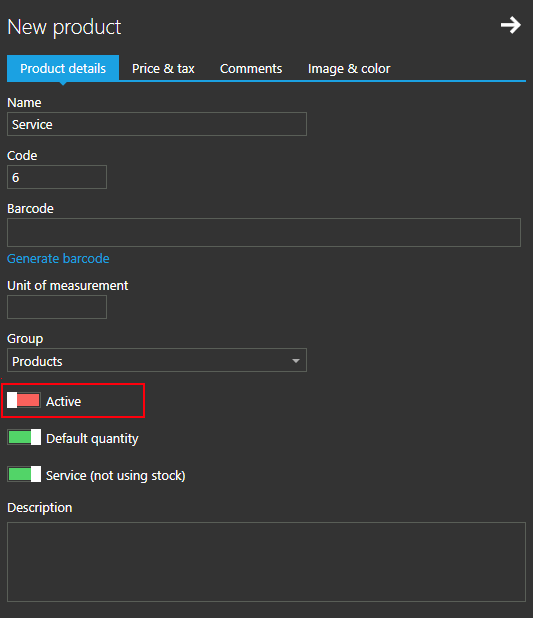
- Uncheck "Active" option, this way it will be available in management (can be added to purchase document) but will not be visible in sales screen for the retail.
When creating a purchase document, add this item to the list and set it's price, as you do for any other item in purchase document.
Please let us know if this helps.
-
Hi Tazakka,
Here are some more details how to set up above describe product.
If you are unfamiliar with creating new product, you can find instructions at https://help.aronium.com/hc/en-us/articles/209345969-Manage-products
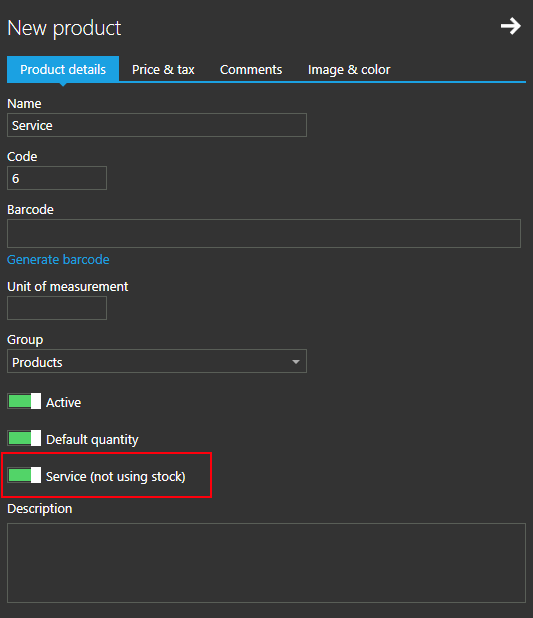
Start by adding new product, enter desired name and other details. In "Product details" tab, make sure "Service (not using stock)" option is turned on, as in the screenshot below.
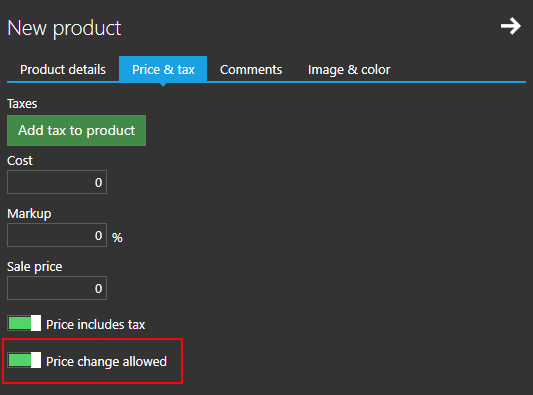
If you wish to use this product in sales, you can turn on "Price change allowed". With this option turned on, you will be asked to confirm or change price every time you add this item to the sale.
Otherwise, if you need this product for purchase documents only (as mentioned before), turn off "Active" option, so this product does not appear in sales screen, but in management only.
Hope this helps.
Thanks, Aronium team.

Please sign in to leave a comment.
Comments
4 comments