How to change the invoice number

Completed

Comments

12 comments

  • Avatar
    Aronium Support

    Hi CK,

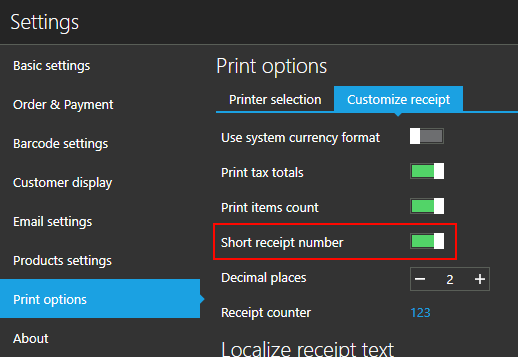
    Go to "Settings / Print options" and select "Customize receipt". Click current receipt number counter, it will turn into editing box where you can enter starting number. 
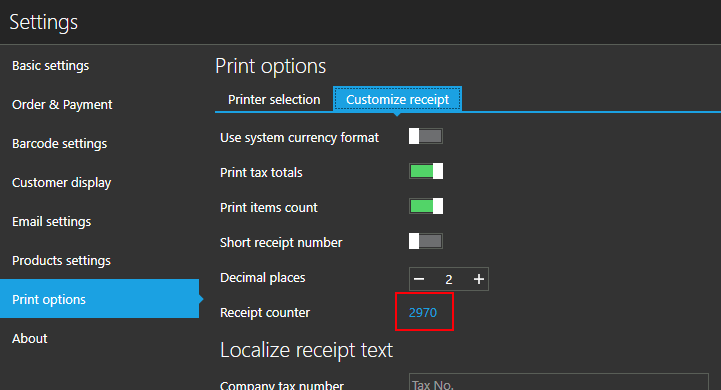
    It is current receipt number, so, if you wish next receipt number to be e.g. 101, you should set the counter to 100.


    0
    Comment actions Permalink
  • Avatar
    CK Yong

    My last receipt number is CB-2016060 then next year I want to change CB-20180001 how to change this?

    0
    Comment actions Permalink
  • Avatar
    Aronium Support

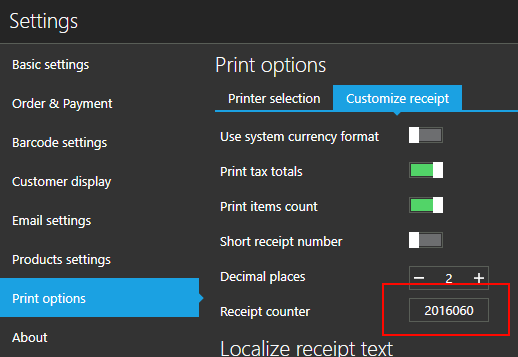
    You can enter 2016060 in the field, that "CB" prefix cannot be used, no prefix is supported.

    You can use also enable "Short receipt number" option, too, next receipt will be printed with "2016061" number.

    0
    Comment actions Permalink
  • Avatar
    CK Yong

    so when we type 2010606 after print out still is 17-200-2016061 right?

    1
    Comment actions Permalink
  • Avatar
    Aronium Support

    Please, turn on "Short receipt number" option, receipt will be printed with "2016061" only

    1
    Comment actions Permalink
  • Avatar
    CK Yong

    Thank you so much!!

    0
    Comment actions Permalink
  • Avatar
    CK Yong

    Sorry I tri already cannot, turn ON the Short receipt number also 17-200-20180001

    0
    Comment actions Permalink
  • Avatar
    Aronium Support

    Can you tell us what do you mean by " cannot turn ON the Short receipt" option? Are you using the latest version?

    0
    Comment actions Permalink
  • Avatar
    CK Yong

    I using 1.18.0.0 version, I mean is I turn on the  "Short receipt number" then I try print out the receipt still same 17-200-20180001 not only 20180001

    0
    Comment actions Permalink
  • Avatar
    Aronium Support

    Can you tell me what printer type are you using? 

    This settings applies to "ESC/POS" and "POS 58/80" printer templates, meant to be printed on receipt (thermal) printers. If you are using "A4", standard invoice is printed and this settings does not apply.

    0
    Comment actions Permalink
  • Avatar
    Jeff Hyder

    Can the invoice number be changed to a string type to allow the use of a prefix like BM, CP, MH just as examples?

    0
    Comment actions Permalink
  • Avatar
    Aronium Support

    Hi Jeff,

    I'm sorry, but there is no way to have custom prefix on invoice. This is a document number consisting of the following <YEAR>-<DOCUMENT_TYPE>-<NUMBER> as "19-200-000123".

    The only thing that may be done is using custom template. If you wish you can submit a support ticket, and we can work together to see if something like this is possible for you.

    Thanks, Aronium team.
    0
    Comment actions Permalink

Please sign in to leave a comment.