Payment Screen
Answered
Is there a way to delay the closing of the payment screen, after selecting one of the Payment Types (Ie: Cash).
The problem is that they amount of Change to be give to the customer displayed on the Payment Screen closes and returns to the main screen, before the cash drawer opens, even when you set the print receipt option to no for the payment type (ie: Cash).
The way this functions now, makes it harder for the person operating the POS, as they have to memorize the amount of change to be given to the customer, before selecting the Payment Type (ie: Cash), and the opening of the cash drawer.
Would it be possible to leave the payment screen open, will the cash drawer is open, and add a new button that would close the payment screen and go back to the main screen, or is their a way to sense when the cash drawer is closed, and upon closing of the cash drawer, automatically go back to the main screen.
Lloyd
-

Hi Lloyd,
There is a similar functionality already, can you tell me do you have "Display receipt print dialog" turned ON, like in the screenshot below?
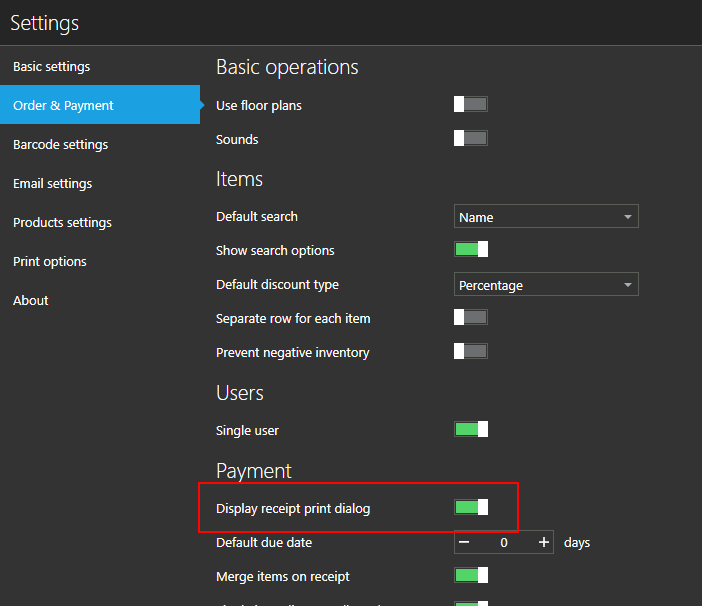
With this option enabled, once sale is made, you will be presented with the screen allowing you to print receipt and see the change amount.

Hope this helps.
-
As we do not print receipts for the Cash payment type, we set the "Don't show this again" to On.
I can got to the Order Payment screen and reset the "Display receipt print dialog".
Will this work with the Payment type new option "Open cash drawer" that you recently added to Payment Types"?
If so, would the Cash drawer still open with out printing a receipt, and all the sales person would have to do would be to click the done button after closing the cash drawer, and this action will return the user to the main screen. I am assuming that the sales person would not have to select any of the four options, to get this to work.
Lloyd
-
Hi Lloyd,
Yes, it will work exactly as you described.
From version 1.18, cash drawer opens even if receipt is not printed, so, cash drawer will open before print dialog is shown (if turned on for selected payment type).
All you have to do after that is click "Done" (or ESC key on your keyboard if you have one attached) to go back to main sales screen.
Just make sure you are using any version above 1.18, this should work as expected.
Please let us know if there is anything left unclear.
Thanks, Aronium team.
-

I agree with Lloyd that the payment screen is a bit fiddly. It's too easy to accidentally close the screen. We are doing this all the time.
We prefer the behaviour of the Split Payment screen, that allows us add payment methods and assign an amount to each. We have found this to be a much more reliable method for inputting amounts. Is it possible to make the split payments screen the default payment screen? -
One last comment... The main problem with the payment screen is that the full payment amount is already pre-filled.
It would be better of the amount was blank by default - allowing us to type in the amount the customer has paid.
The problem we have is that because the payment amount is prefilled, its easy to accidentally process the payment before fully reading all the details of the sale, such as how much to pay, how much change is required etc.
I hope this helps clarify.
Thanks
Please sign in to leave a comment.
Comments
5 comments