Aronium Pro POS on different computers

Dear Aronium Team,
I am reaching out to seek assistance with using Aronium Pro POS on different computers. I am encountering difficulties in linking the product to other computers. Products are showing in product management, but when it comes to sales you don't find the product by barcode scanning or typing the name. If I clarify more, We added the product through the laptop which is not the database, and tried to do the sale on the desktop which is we are using as the database. So it's not syncing to the database pc if I add products from the other pc's. The 2nd question is do I have to purchase 2 pro versions to run the software in two different pc's. Because I see two different activation keys. I would really appreciate your guidance on how to resolve this issue. Thank you for your help.
Thank You!
-

Hi Brahim,
First, to clearify, you do not need to purchase 2 licenses, one license is enough to be used on both of your computers, that is the purpose of Aronium Pro.
If you have all computers connected to the database as expected and you can see the products in Management section in all computers, the problem may be with the fact that you need to restart Aronium after adding products on PC1 so you can see them on PC2.
When you run Aronium, products are loaded from the database and are kept in memory for fast access (in sales screen only). If you are making changes on one computer, you will see the changes in sale screen on that computer immediatelly, but, to see the changes (or new products) in sale screen on a second computer, the easiest way is to restart Aronium on the second computer so new products are loaded there, too.
Hope this helps.
Thanks, Aronium team.
-
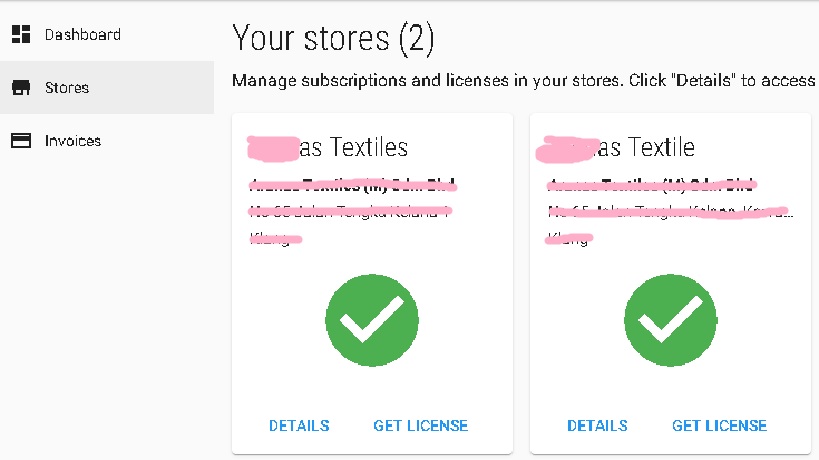
The thing is I've created 2 stores accidently when I install the software in the both computers. I just notice by the activation key because it's different. Both computers are using 2 different stores. I'm so confused what to do now. The database server is running under the store on the right side in the picture and the PC 2 is running under the left side store. Please guide me because we're already comfortable with the system and in a hurry to purchase the pro version.
Thanks,
-
We have already sent you an email requesting some more information. Please check your inbox from email coming from support@aronium.com and let's continue the conversation there.
Thanks, Aronium team.
Please sign in to leave a comment.
Comments
5 comments