Connecting Cash Drawer

I have installed a Beldon Pos printer and a cash drawer connected to it.(Printer Brand – BELDON / MODEL – BNPP-99I-USB)
But it is unable to open cash drawer via Aronium using "Open Drawer" button and "Test Drawer" Button.
But I could manage to connect drawer via device manager using following settings.
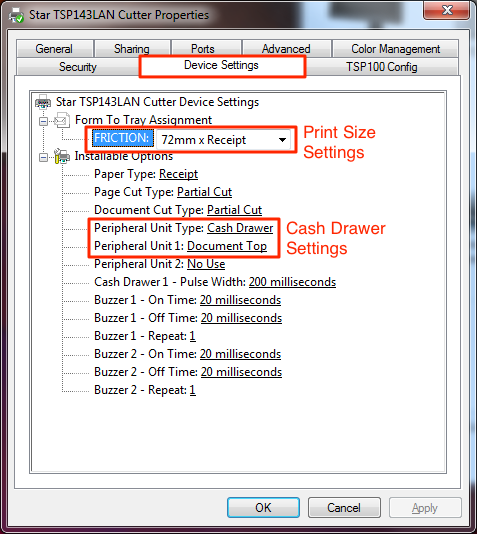
But the sad thing is these settings only opens drawer with the print. It cannot be opened via the command buttons provided by the software to open.
Please help me to setup this, accurately.
Thank you.
Lochana.
-

Hi Lochana,
You will need to find a correct cash drawer ESC/POS code and enter it to printer settings so cash drawer can be controlled by Aronium. You can find instructions at https://help.aronium.com/hc/en-us/articles/115002486449-Cash-drawer. At the bottom of that page, you will find the list of known cash drawer brands and models, hopefully you can find yours there. If you can't find your cash drawer there, the best we can suggest is reaching out to your hardware dealer and ask if they can supply the correct ESC/POS codes for the drawer or consult the drawer documentation as it may contain these codes.
If you manage to find the codes for your drawer and to make it work, make sure you remove the opening of the drawer from printer configuration (explained in your post) as you will be able to control the drawer via Aronium and you may not need it to open on every print.
Hope this helps.
Please sign in to leave a comment.
Comments
1 comment