ESC / POS PROBLEME

I am using a Gainscha GA-200i thermal printer with Aronium POS. The printer is installed using the official Windows drivers.
I’m experiencing an issue when printing 80 mm receipts. In this mode, Aronium does not properly recognize the printer or communication type, and printing does not work as expected. However, when I switch to 58 mm printing, everything works correctly.
I tested the same printer with another POS system (Loyverse POS), and it works without any issues for both 58 mm and 80 mm. In Loyverse, the printer uses ESC/POS, which suggests that ESC/POS support provides better compatibility for this device.
Currently, Aronium only offers print types such as Windows Print or Generic, and there is no option to select ESC/POS.
I would like to request adding ESC/POS as a selectable print type, similar to Windows Print or Generic. This would improve compatibility with thermal printers like the Gainscha GA-200i and help avoid issues related to receipt width (especially 80 mm).
Thank you for considering this feature request.
-

Hi Followmeta0,
ESC/POS is already there. This Generic printer type is actually ESC/POS implementation that, from what we know so far, works on most ESC/POS capable printers. It is just we named it that way instead of "ESC/POS" but it is using ESC/POS protocol and, as long as your pritner supports ESC/POS, all commands should be compatible with it.
Please try setting up Generic printer type as described at https://help.aronium.com/hc/en-us/articles/115003405831-Setting-up-Generic-Text-only-printer and let us know if you managed to make it work. If it worked with other ESC/POS software, it should work correctly with Aronium, too.
-
Please see https://help.aronium.com/hc/en-us/articles/9196380366866-Print-logo-on-Generic-Text-only-printer, this is how you can add a logo to the printer. Once you add a logo to the printer, make sure you enable it in printer settings, as in the screenshot below.
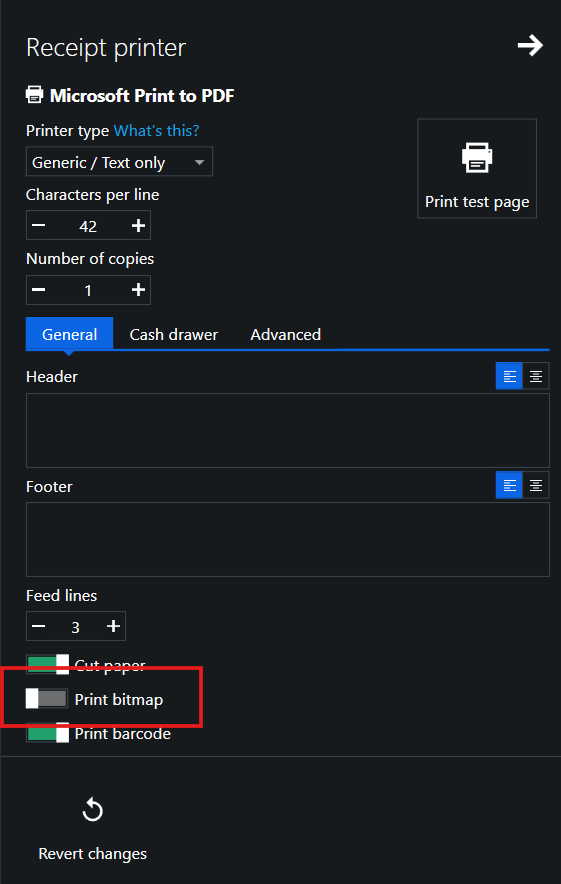
Hope this helps.

Please sign in to leave a comment.
Comments
3 comments