Restaurante tip and other missing characteristics

In restaurants in some countries it is normal for the waiter to request the tip service that is added to the bill receivable, this tip usually has a cost of 10% before the value of taxes if there are and adds at the end, in this way
Consumption $ 100,000
Tax 19% $ 19,000
Tips $ 10,000
TOTAL $ $ 129,000
Other features that are lacking in this modality is the issuance of a proforma invoice, which is delivered to the diners to verify the amount to be paid and define whether the payment is made in cash or by using a debit or credit card. credit card.or can also be of mixed payment modality.
Once the payment means or means have been defined and processed, the final invoice is issued.
Another function is the breakdown of payment by diners
that is, at a table 3 people are eating, at the moment of requesting
bill for payment one of the guests chooses to pay their consumption, in this way as they have other restaurant management software is from that general table the individual or group payment as appropriate.
-

Hi Enrique,
Some of those functionalities exists, here are the answers.
Restaurant tip
Automated adding of percentage is not planned at this moment, you can create a product, name it "Tip" (or whatever), turn on "Price change allowed" and add it to the sale, you will be prompt to enter price, obvious downside is that you have to calculate amount yourself.
Here is the existing request - https://help.aronium.com/hc/en-us/community/posts/115001380272-Add-Tips-on-the-final-bill-and-maybe-custom-receipts
Please, vote for existing ones instead duplicating requests, it will be much harder to follow if we have duplicates in community, votes will spread among multiple requests.
Proforma
There is a "locked sale" option made exactly for this. All you have to do is turn on "Print locked sale" in printer settings, once you lock a sale, receipt-like ticket will print, allowing you to present it to the customer and wait for final receipt.
Breakdown of payment by diners
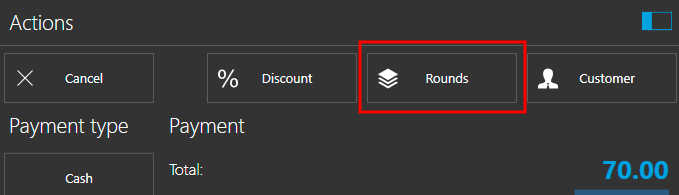
You can achieve this by using "rounds". All you have to do is to save (or press "new round" button) after each order.
In payment screen (pressing F10 button) you will see a "Rounds" button, allowing you to choose what round will be closed and print receipt for each round.
-
Request
PROFORMA
Ok I'm trying what you can do but for sale blocked, the only way I found to do the printing, having already configured the blocked sale printer, is placing the means of payment which ends the sale. - This is supposed to be the proforma invoice to be delivered to the client to indicate us what is their means of payment You can initiate me how to make that impression in that state of proforma since I do not see the option
TIPS
As for the tips, here is a very serious error, since to be defined as tax, the monento make the closing of the sale and the print is printed as a tax, which is not so, and generates very serious problems with the tax department of each country, this tip service,IT IS A NON-REMUNERABLE INCOME FOR THE STATE, SINCE IT IS A PRIZE (BENEFIT) OBTAINED BY THE WAITER FOR HIS ANTENTION AND THE SAME IS EXCLUDED FROM ANY TAX PAYMENT FOR THE PERSONNEL WHO RECEIVES IT
would have to think about including in the area of printing configuration and personalization of the ticket, a special item for service that at the time of printing it is clear that its value is not imposed as such and corresponds to the suggested tip value.-
regards, Enrique
Please sign in to leave a comment.
Comments
2 comments