Auto Backup
Completed
Please add automatic daily scheduled backup of database. Thanks.
-

I am not a programmer but I managed to create a simple batch file ( a file that, when run, will back up your pos.db file) or you can even add it to your Windows Startup folder to have it run each time you start your computer.
( yes it would be better to back it up on close down, but this way you can forget it.)
and if you want to back up to a different location than Documents\Aronium\Backup\ then just change the location in the code
Copy and paste this code to a text file and name it something like AroniumBackup.bat
(it must be named .bat )@echo off
Rem Backup a Copy of your Aronium POS Datbase File
Echo This will make a Backup copy of your POS Database file Y/N?
echo[
Echo Any Key for YES, Or X (TOP Right Corner) for N
echo[
Echo This will only make a NEW backup if there has
Echo been a change to your Aronium System
echo[
Echo Press Any Key Continue and make a backup
ECHO (and Close this window). . . or Wait for count down
@echo off
REM Copy Specified file to backup folder
REM Change USERNAME to your User Name listed as your user (After Users/) that is listed in your own PC in each of the 3 statements below
xcopy "C:\Users\USERNAME\AppData\Local\Aronium\Data\pos.db" C:\Users\USERNAME\Documents\Aronium\Backup\ /c /s /r /d /y /i > C:\Users\USERNAME\Documents\Aronium\Backup\xcopy.log
TIMEOUT /T 10 -
I have been told .bat are old school haha
So I now have found and worked out a script for .vbs which can be run with the windows Task Scheduler
If its ok with the Admin I will add the script here in a .vbs file for others to grab and change to suit their own machine/
Let me know Bosco if I can add it here as a file or as text -

Hi Pete,
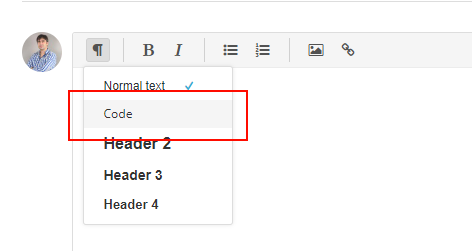
You can paste the code in a comment, so it can be double checked, and I am sure other users will find it useful. You can use formatting to make it easier to read.
IMPORTANT! Please make sure you are running your scripts when Aronium is turned off, or at least at the moment when no database transactions are made to make sure that backup file does not get corrupted.
Thanks,
-
Here is the .vbs script
Change YOURUSER to whatever the User is that you are using in your PC
and Change the backup location to where ever you want it to go.
Then set up a Task Scheduler to run this at startup etc ( which runs it before Aronium starts)sSourceFolder = "C:\Users\YOURUSE\AppData\Local\Aronium\Data\"
sBackupFolder = "C:\Users\YOURUSER\Documents\Aronium\Backup\"Dim objFSO
Dim sSourceFolder
Dim sDestFolder
Dim sDBFile
Dim sDateTimeStamp
Const OVER_WRITE_FILES = True
Set objFSO = CreateObject("Scripting.FileSystemObject")
sSourceFolder = "C:\Users\YOURUSE\AppData\Local\Aronium\Data\"
sBackupFolder = "C:\Users\YOURUSER\Documents\Aronium\Backup\"
sDBFile = "pos"
sDBFileExt = "db"
sDateTimeStamp = cStr(Year(now())) & _
Pad(cStr(Month(now())),2) & _
Pad(cStr(Day(now())),2) & _
Pad(cStr(Hour(now())),2) & _
Pad(cStr(Minute(now())),2) & _
Pad(cStr(Second(now())),2)
'If the backup folder doesn't exist, create it.
If Not objFSO.FolderExists(sBackupFolder) Then
objFSO.CreateFolder(sBackupFolder)
End If
'Copy the file as long as the file can be found
If objFSO.FileExists(sSourceFolder & "\" & sDBFile & "." & sDBFileExt) Then
objFSO.CopyFile sSourceFolder & "\" & sDBFile & "." & sDBFileExt,_
sBackupFolder & "\" & sDBFile & "_" & sDateTimeStamp & "." & sDBFileExt,_
OVER_WRITE_FILES
End if
Set objFSO = Nothing
Function Pad(CStr2Pad, ReqStrLen)
Dim Num2Pad
Pad = CStr2Pad
If len(CStr2Pad) < ReqStrLen Then
Num2Pad = String((ReqStrlen - Len(CStr2Pad)), "0")
Pad = Num2Pad & CStr2Pad
End If
End Function -

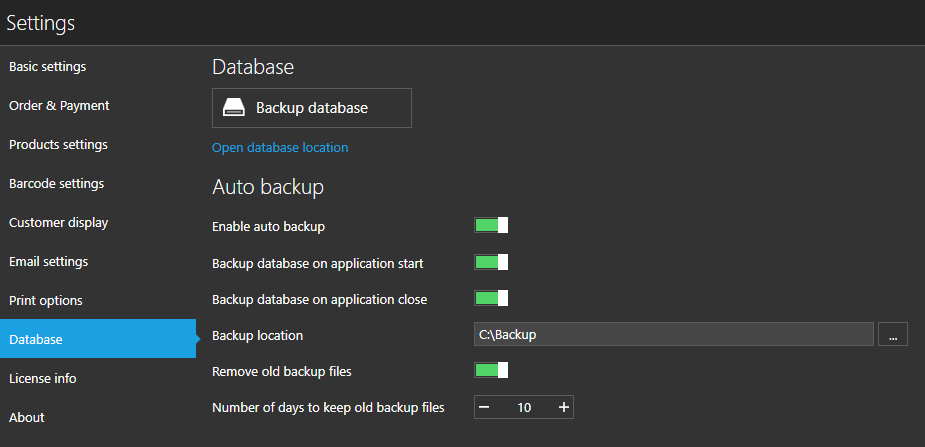
Hi, I found a small program called "Everyday Automatic Backup" that will backup the .POS file.
You can schedule that backup to be run at anytime. I have it scheduled to do the backup on 'Startup' in the morning, before I open up Aronium. It is set to save to the D: drive. So, I put in my backup flash drive and start the computer, once everything is done (startup and backup) I then open Aronium and open the bar.
CAUTION: Do not run this on schedule time for when you are using Aronium. The .pos file you are backing up is being actively used by the system, backing up while you are using it (making a sale etc) could cause a fatal error in that file and you will lose all your data. Make sure Aronium is not running at the time you do the backup. Either do it on startup in the morning or run it manually at night after you close down Aronium.


Please sign in to leave a comment.
Comments
10 comments