Reports don't show decimals
Answered
I'm having a weird issue with Aronium on the store machine I wanted to use it on. I set everything up on my personal system to check everything out and see if Aronium was the way to go for our small shop, works perfectly and ahs everything we need. So I installed it on the shop laptop. Inserted some of the products and ran through the whole process just to double check, turns out for some reason non of the reports show decimals. While the test set-up on my personal system do.
I reinstalled aronium thinking I might have checked an obscure box or something, but even the clean install won't show decimals in reports.
Am I missing something? Did I accidentally check a wrong box multiple times? Any idea on how to get decimals back on my reports?
I moved the database from the test machine to the store machine, which didn't have any effect.
I have Aronium running on Windows 10 if that is useful to know.
- Roel
-

HI Roel,
Thanks for reaching out.
Reports are using Windows regional settings to print number (currency) format.
As described in this article, showing you how to set currency symbol, please double check number of decimal places used, as this may be the problem.
Please let us know if this worked for you.
Thanks, Aronium team.
-
Hi, thanks for the quick reply!
I just had a look at the Windows regional settings and those seem to be in order. And changing those does indeed effect the invoices Aronium generates. Those are fine, and if I change the number of decimals or currency symbol in Windows, those change on the invoice.
But it has no effect on the reports Aronium generates. If I generate a Product report everything looks perfectly fine (it seems to calculate everything the way it should, all sales seem present) apart form the fact that the values are rounded up/down.(just to have as much info as possible, I just moved the database to the test computer and ran a report, that came out fine).
If I make a single sale on this day Aronium generates this invoice and product report for the day: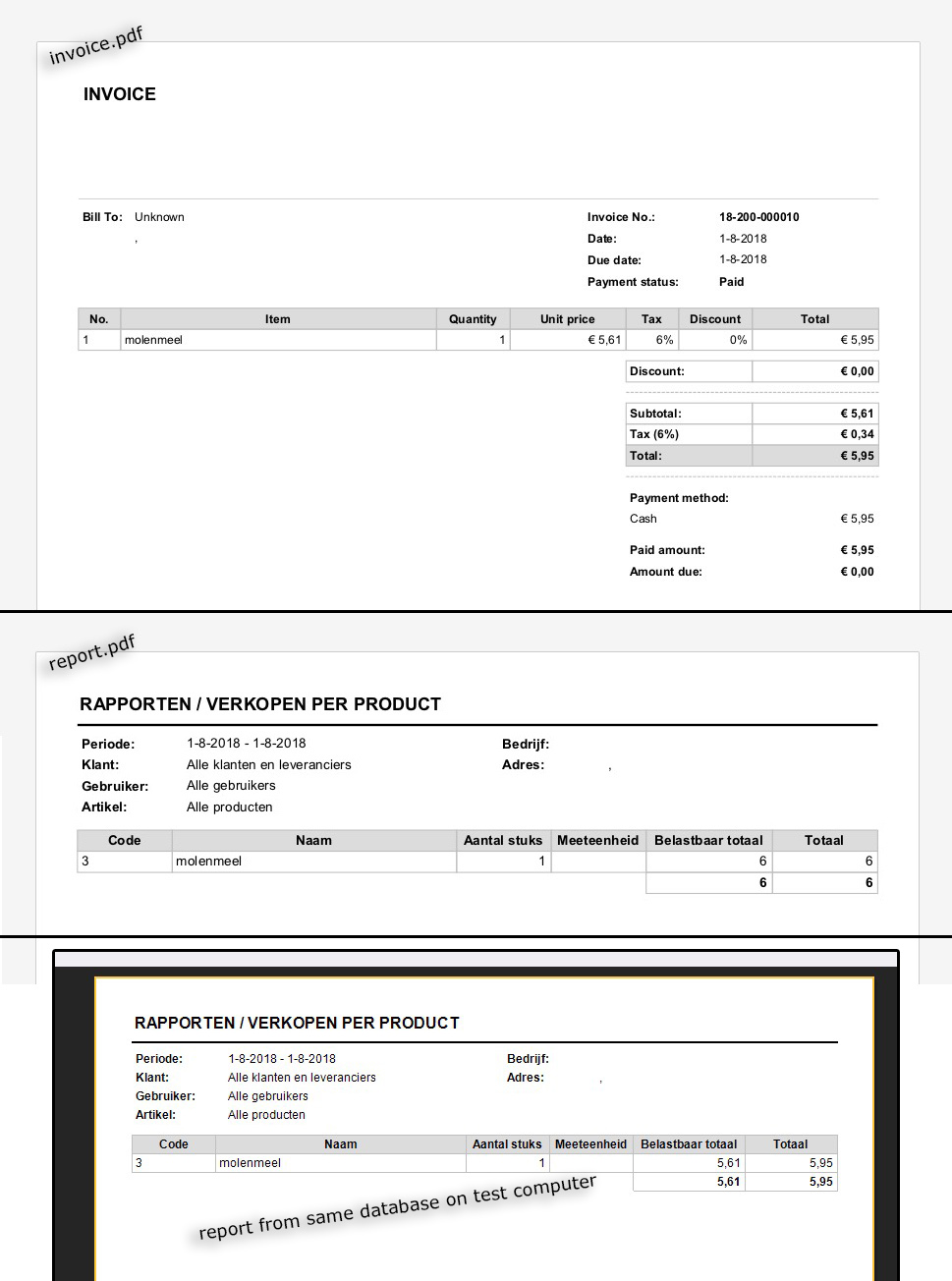
-
Hi Roel,
Thanks for the update.
I can see that you are using other language then English. Can you please try changing to English and run these reports?
I am asking this as localized (translated) reports are separate print templates, and that may be the reason for this. So, if English language prints decimals correctly, we will be able to tell more and fix this issue in localized template.
Thanks, Aronium team.
-
Hi,
I'm running in Dutch on both systems, but I switched them to English just to make sure. Ended up with the same results. The shop laptop shows no decimals in Dutch or English. The test computer shows decimals in both.
Another bit of info, both systems ran the previous version of Aronium and were updated this morning to 1.22.2.0. The issue has been the exact same in both versions.
- Roel
-
Hi Roel,
We have double checked the template, both English and Dutch template are printing decimals as expected. You have seen the same situation on your second PC, so we still believe it is something related to local PC settings.
Can you please share with us a screenshot(s) of your regional settings, both number and currency separately, so we can check it out?
Thanks, Aronium team.
-
Hi,
It's fixed! I checked the currency tab earlier, which was fine. Just opened those settings on both machines side by side and compared, and also had a good look at the "numbers" tab in the regional settings. That's where the error was. The "number of decimals" in the "Numbers' tab was set to 0. Changed that to 2 and now the reports look fine :)
Thank you so much!
- Roel
Please sign in to leave a comment.
Comments
6 comments