Addition of Comment to main receipt

Hi,
I am looking at putting the Sales Line Comment that would come out on the kitchen printer ticket, onto the main receipt.
Is it simply a case of adding the details about 'Comment' from the kitechticket.frx file into the receipt.frx file?
Adding to the Table Source
<Column Name="Comment" DataType="System.String"/>
and to the databand:
<ChildBand Name="CommentBand" Top="106.5" Width="302.4" Height="18.9" CanGrow="true" CanShrink="true">
<TextObject Name="Text1" Width="302.4" Height="18.9" Dock="Fill" CanGrow="true" CanShrink="true" Text="[Items.Comment]" Padding="20, 0, 2, 0" Font="Arial, 10pt, style=Italic"/>
This would help me out until this option is available in a future release.
-

Hi Matt,
Thanks for reaching out.
The problem is not print template, it would be easy to add this there. The problem is that kitchen notes (comments) are not preserved anywhere after the sale is closed, so they are not available in sales document.
Once sale/order is closed (sales document created), open order is deleted and kitchen notes / comments are deleted, too, we do not store them in database after this moment, and this is the reason why they are not available in receipt.
So, these comments are meant to be used for kitchen only, as the name say. There are other request to add serial numbers and product variants, and I am sure these options will be added in some of the future releases, but printing kitchen ticket comments in receipt is something we do didn't plan.
The only thing that could be printed in receipt (custom template) in a form of comment is product description, but it is fixed and not editable during sales, so I am afraid this wouldn't work for you.
Regards, Aronium team.
-
Hi Matt,
Thanks for understanding.
However, we would like to know more and be aware of how are you using these comments, as it may be that you are using it in some other way than the one we thought you would, and it may be that there is a valid point in extending this so they are kept after the sale is closed.
Our idea of kitchen notes was to put some extra info for kitchen (e.g. "extra milk" or "medium rare" steak ...), that does not have to be printed in receipt, as they do not change the price of a product and should not be client facing.
Can you (or anyone else who wish to share this with us) please provide some more details how do you use these notes, an example of what you are putting as a comment, just for us to be aware how do you actually use them and for what purpose?
As I said, it may be that many users do not use these comments the way we though they will, and there is a good point in having these comments saved and available for receipt, or at least, create a similar functionality that will serve this purpose.Thanks.
-
Hi,
We sell our clothing in our outlet store. We have a mixture of New, Sale and faulty/damaged stock.
A new item will be made available for sale, may then get discounted for sale... and then possibly be reduced further if missing a button or whatever.
When making a sale for the faulty item, we would reduce the price/discount it and add a line note/comment to the item to show that it was reduced in price - and is therefore not covered by our returns policy, etc.
This will then display on the receipt/invoice and sales history should that item come back.I am assuming this would be very similar in implementation for the users who require Serial Number/IMEI numbers or similar against their sales.
-
HI Matt,
Thanks for the explanation, much appreciated.
This sounds more like product variants (modifiers) feature.
Once implemented, product modifiers will allow you to specify which modifiers (variants) you want to use, so, you'll be able to create them according to your needs.
For example, you will be able to define modifiers as XL, XXL, Red, Blue, New, Damaged or anything else you may need to specify and track.
If a product has modifiers assigned, user will be able to select them before it is added to the sale or purchase document.So, in addition to ability to print modifiers on receipt, this will give users an option to see how many of each variant is on stock, so I believe this would be the feature that will serve your needs.
-

Good afternoon, we are a bicycle shop and we are also need this feature as when we sell a bicycle we must add bicycle serial number on the receipt, which at the moment we are adding by creating a new customer for each sale and add serial number in the address or zip code line of customer details, creating plenty of customers just to add this feature in the receipt.
-
Hi May,
You can have notes on receipt with these simple steps.
Make sure you are using the latest version, as receipt from version 1.23 is printing public notes by default. If you are not using the latest version, you can download it from our website.
Once you have latest version installed, download and install notes plugin from https://www.aronium.com/download/Aronium.Pos.Notes.exe
Restart Aronium and in next sale you should see "Add notes" option in print dialog screen, as in the screenshot below.

If you need any help, please let us know.
Thanks, Aronium team.
-
We have placed a quick fix for this, notes plugin should work with both old and new Aronium versions.
Please, download plugin again from https://www.aronium.com/download/Aronium.Pos.Notes.exe, and try it out, this error should be gone even if you are running version before 1.23.
Thanks, Aronium team.
-
The reason why you do not see a note in receipt is because receipts prior to version 1.23 does not includes them.
Now, we have two options:
- Upgrade to latest version 1.23 (recommended)
- We can send you custom receipt template with notes included
Please let us know what you prefer.
Thanks, Aronium team.
-
Hi Michelle,
We have just tried this with 1.24.1.2 version and we were able to install Notes plugin and it worked as expected. Can you please share some more info as it is compatible with the latest version or send a support request here so we can help you out?
Thanks, Aronium team.
-

We need to be able to add serial numbers (unique values) to specific line items that correlate to the individual line item prices. Without this ability we can't trust that the customer will not come back and try to return a different product or claim that if they purchased two items (each with a serial number) that the one they're returning isn't the one that was the more expensive product. It's not just the ability to put it on the receipt, either, it needs to be stored in the documents so it can be recalled when searching for the purchase records. Per-item *stored* notes are a simple necessity.
Are there any plans to implement this ability?
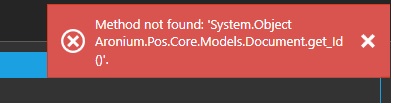


Please sign in to leave a comment.
Comments
19 comments