Add shutdown button to application exit options
Completed
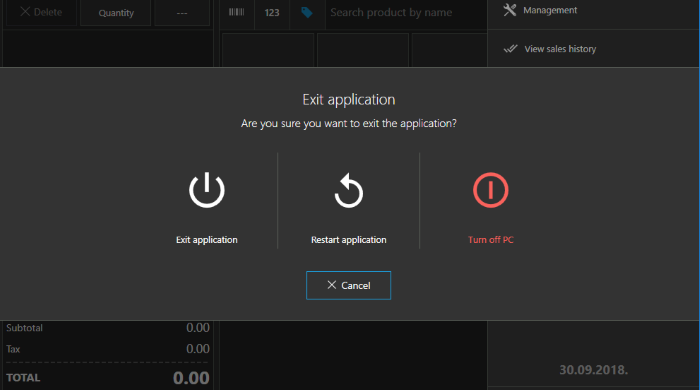
When clicking "Exit application" in the flyout menu there are options for "Exit application" or "Restart application", could "Shutdown" be added to this list? It would be useful for Kiosk mode as it would allow the computer to be shutdown directly from Aronium, rather than exit Aronium, then shutdown the computer separately.
-
Official comment

Option to turn off PC directly from exit screen is available with version 1.24
Comment actions -
Also when "Show cash in on application start" is enabled and Aronium is used fullscreen there is no easy way to exit Aronium after printing the Z Report as Aronium immediately shows the cash in page with no option to exit or cancel. I have to leave fullscreen mode and click the X in the top-right corner.
I would like the option to Exit/Shutdown to be offered after printing the Z Report when "Show cash in on application start" is enabled.
This would allow me to easily do the following: At end of day print Z report -> Shutdown PC --- Following morning start PC -> Aronium show cash in page.
Thanks
-

Can't remember quiet where on the forums but shutdown of complete POS system has been requested before now. I don't think Ash shutdown of systems would be advisable after z report as this in my opinion wouldn't be suited to most user applications of Aronium as some would still want to access Aroniom features, reports etc, after end of day Z reports.
However an option to shutdown in the original placing of restart and exit application would be advisable and has been requested before now from my understanding. This would provide an option to shutdown but allow for those that still wanted full or certain access after z reporting.
I think shutdown is a feature request that should be prioritised
Regards,
Gareth
-
Hi Fahim,
We hope that auto backup should be available in some of the future updates by this feature request.
If / when auto backup is implemented it will be executed on application shutdown, no matter if you closed Aronium by closing main window or by clicking shut down button in this dialog.
Until automatic backup is implemented, please make sure you have your database copied on regular basis.
Thanks, Aronium team.

Please sign in to leave a comment.
Comments
9 comments