Disable sound when navigating product groups, but keep sound when product added/error.
Completed
I like the sound when an item is added to the order, and it's important to have the error sound if a barcode is not found. However having a sound play every time I browse the product groups in the Visual layout is annoying, especially as I have many nested groups.
So can we have an option to disable the sound when clicking on a group?
Thanks
-
Official comment

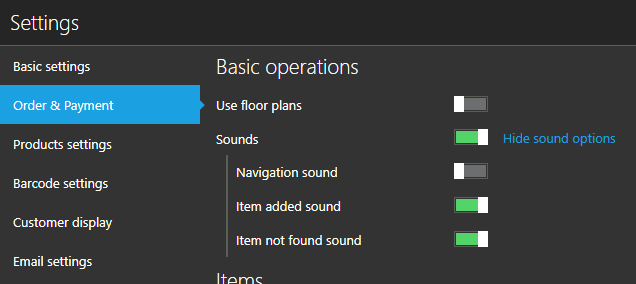
This is available with version 1.29. More sound controls are added, so we hope you'll be able to configure it according to your needs.
 Comment actions
 -
Hi Ash,
Thanks for bringing this up, we'll try to address this in the future, if possible.
Currently, there is no way to disable sound for groups only.
One thing that can be done is deleting a sound file for click, but it will remove item click sound too. So, you will have no sound when clicking groups and products, but you will still have error notification if barcode is not found.
If this works for you, all you have to do is delete "click.wav" file that can be found at "C:\Program Files\Aronium\Media".

Best regards, Aronium team.

Please sign in to leave a comment.
Comments
4 comments