Item discount by entering new price

When reducing items (eg. near expiration date) we use stickers like these:
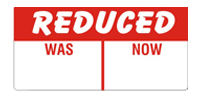
The discounts used are not always the same percentage. When entering this discount the cashier must calculate WAS - NOW to get the amount to enter in the "Discount by fixed amount" box. Would it be possible to add a 3rd discount type, "New Price", to allow the cashier to just enter the new price and have Aronium calculate the discount?
Thanks again for your incredible work, I know that I have made a lot of requests lately but I really appreciate your openness to suggestions.
-

Hi Ash,
Thanks for the request and explanation.
This is somehow doable already in Aronium. What you can do, you can turn on "Price change allowed" on products that are about to be sold with reduced price. You can find instructions under "Price & Tax" section at https://help.aronium.com/hc/en-us/articles/209345969-Manage-products article.
With this option enabled, you will be prompt to enter new or confirm actual price every time you add an item to the sale.
We are aware this will not be presented as a discount in receipt, but we were hoping you can use this as a workaround.
Thanks, Aronium team.
-
Yeah, I know about the "Price change allowed" option, unfortunately however I think that for my purpose this would be more inconvenient than doing the maths to work out the discount.
Typically only 1 or 2 pieces of a product are reduced, and the rest of the stock of that product remains full price. Using the "Price change allowed" option would mean having to editing the product on the till every time something needs to be reduced. Also it has potential for confusing the cashier who won't be expecting the "Price change" box to appear for a non-discounted version of the product (I can foresee a situation where the cashier is quickly scanning items and doesn't notice the "Price change" pop-up, because it doesn't normally pop-up for that type of product, and immediately scanning another item resulting in a barcode being entered in the price box.)
I appreciate the suggestion though. Thanks.
-
I've thought of a slightly different way that this could be implemented (See image):
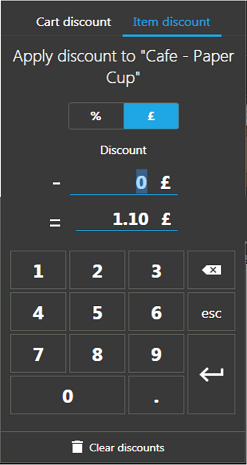
The cashier could enter a number into either box and Aronium could calculate the value for the other box. This would allow you to see the result of the discount before applying it, and could be added to "Percentage discount" and "Cart discount" as well.
As a related suggestion: Have you considered making the "Enter" button green and the "esc" & "Clear discounts" buttons red to match other parts of Aronium?
Please sign in to leave a comment.
Comments
3 comments