Items list disappeared

Hi, as one of the users was working he accidentally made the products list (items grid) disappear. We tried everything (sign in and out, restarted the app, change layout from visual to standard and back ...) but won't come back. Can anyone help!?
-

This same thing happened to me too, i think he's referring to the grid of products list on the main screen when you are in Visual layout. It happens when you drag the separator in the middle and take it off screen. There's an easy way to fix it, Just use the left and right arrow keys on the keyboard to move it back to the center of the screen. Make sure you click on the main screen area so its selected first.
-

Hi Yao,
Yes, you are right, they reached out via private message and we were able to solve it. Only they had to delete configuration file and revert settings to default, but that was the issue.
We'll restrict this behavior so it doesn't happen to anyone else in the future.
Thanks, Aronium team.
-
Hi David,
The config file is named "Application.XML" and It's located in C:\Users\[USERNAME]\AppData\Local\Aronium. Close Aronium and then delete "Application.XML". The application will generate another one with default settings when you re-open Aronium. Hope this helps.Regards,
Fahim. -

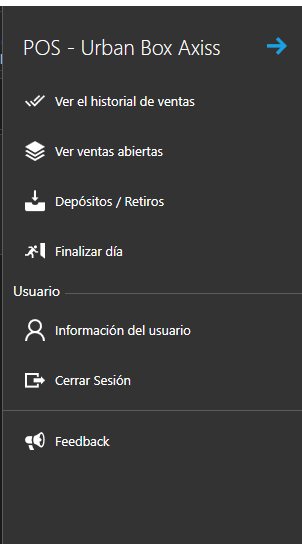
hello guys! Just had this problem, yesterday I was uploading products and turned off the computer at the end of the day. Today when I log in and open the flyout menu the configuration button has disappeared. I already tried erasing the Application.xml doc, didnt work.
here is the attached printscreen. Thanks in advance for the help!

Please sign in to leave a comment.
Comments
6 comments