Saudi Arabia electronic invoicing and printing QR code in receipt
Completed
-
Official comment

Hi everybody,
Thank you for your patience.
We have created a plugin for printing QR code on receipts and invoices (simplified invoice) by following ZATCA implementation guidelines.
QR code will be embedded at the bottom of the receipt automatically and will contain required fields, encoded by the specification and requirements provided by ZATCA.
Example

AQdBcm9uaXVtAgkxMjM0NTY3ODkDEzIwMjEtMDktMjFUMTk6Mjk6MTUEAzExNQUCMTU=
The content of this QR code, when decoded, will contain the following information:
(1) Aronium
(2) 123456789
(3) 2021-09-21T19:29:15
(4) 115
(5) 15Content is structured using TLV (tag-length-value) protocol and encoded in Base64 format, as required by the implementation instructions, from "Security Features Implementation Standards" document, section 4.
Scanning and reading the QR code
As suggested by ZATCA official video (https://youtu.be/QFrIkQhHlF0 at 49m50s), a special applications must be used to correctly read and presents all the details of the QR code.
One of this applications created by one of the solution providers can be downloaded from the links below:- Android: https://play.google.com/store/apps/details?id=com.posbankbh.einvoiceqrreader
- iPhone / IOS: https://apps.apple.com/us/app/e-invoice-qr-reader-ksa/id1580793042
Download
You can download the plugin from https://www.aronium.com/en/features/e-invoice-ksa.
NOTES:
- Minimum Aronium version required for this plugin is 1.36. Please make sure you have the latest version installed on your PC.
- Plugin works with POS 58/80 and POS 58/80 RTL print types only
*****
UPDATE - November 19, 2021
We have released an update that prints required title on all receipts and refunds.
You can see the official requirement on ZATCA's workshop video at https://youtu.be/QFrIkQhHlF0.
The latest update is available at https://www.aronium.com/en/features/e-invoice-ksa.
*****
UPDATE - November 22, 2021
Aronium is now officially listed as electronic billing system provider for B2C businesses.
You can find us among others on solution providers directory page by searching for "Fusionpos", as that is the name of the company which hold the rights of the Aronium software.
*****
UPDATE - November 29, 2021
We have released an update that prevents tampering and deletion of sales and refunds documents.
The latest update is available at https://www.aronium.com/en/features/e-invoice-ksa.
IMPORTANT: This update requires version 1.36.
*****
UPDATE - January 10, 2022
We have released an update that allows you to resize QR code and to select invoice A4 QR code placement, so you can choose if you wish to print QR code on top or the bottom of the A4 invoice.
The latest update is available for download at https://www.aronium.com/en/features/e-invoice-ksa.
Comment actions -
Hi everybody,
We are aware of new Saudi Arabia ZATCA's requirements and we are currently working on it.
Please subscribe to this topic, we will post all updates here. We expect to have BETA module with simplified E-Invoice for phase 1 ready for testing in next couple of days. Stay tuned!
Thanks, Aronium team.
-
Hi Moi,
We have prepared a plugin for printing QR code on simplified invoice (receipt). Please see the official comment on the beginning for the instructions and more details.
Also, make sure you are subscribed to this thread, we will post any updates regarding KSA e-invoice support here.
Thanks, Aronium team.
-
Hi Hamid,
QR code content is encoded in Base64 (see the official comment), something like:
AQdBcm9uaXVtAgkxMjM0NTY3ODkDEzIwMjEtMDktMjFUMTk6Mjk6MTUEAzExNQUCMTU=
You should see a similar "hash" when scanning the QR code. If you wish, you can send us the content so we can decode it and double check if it contains all the values from the receipt.
Thanks, Aronium team.
-
Hi Hamid,
We believe there is one "=" missing at the end of the encoded value.
When we add that "=" at the end to make Base64 value correct, we can decode it, read your company name and tax number, time of the receipt with total of 2.00 and tax amount of 0.26, as below.
(1) <YOUR COMPANY NAME - IN ARABIC>
(2) <YOUR TAX NUMBER>
(3) 2021-10-08T19:36:43
(4) 2
(5) 0.26
Can you confirm these values are the values on the receipt that generated that QR code?
-
From what we can see from "Security Features Implementation Standards" document, there is only 5 fields required for simplified invoice in phase one, and invoice number is not required.
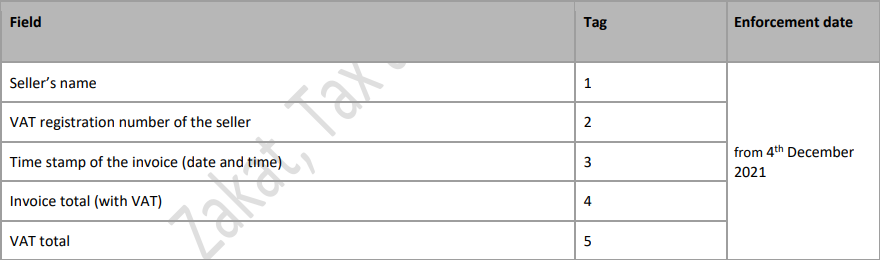
If you have any different information, please let us know.
Thanks, Aronium team.
-
Hi Ismail,
I believe we have answered to this question on a support ticket, just in case other users have the same question, we are pasting the answer here, too.
Saudi Arabia requires users to print QR code encoded as Base64 value and previously formatted using TLV (tag-length-value), please read the official comment carefully, you will find the link to official ZATCA documentation there. Please double check your source and see the part of the documentation below that is clearly stating how the QR code value should be printed.
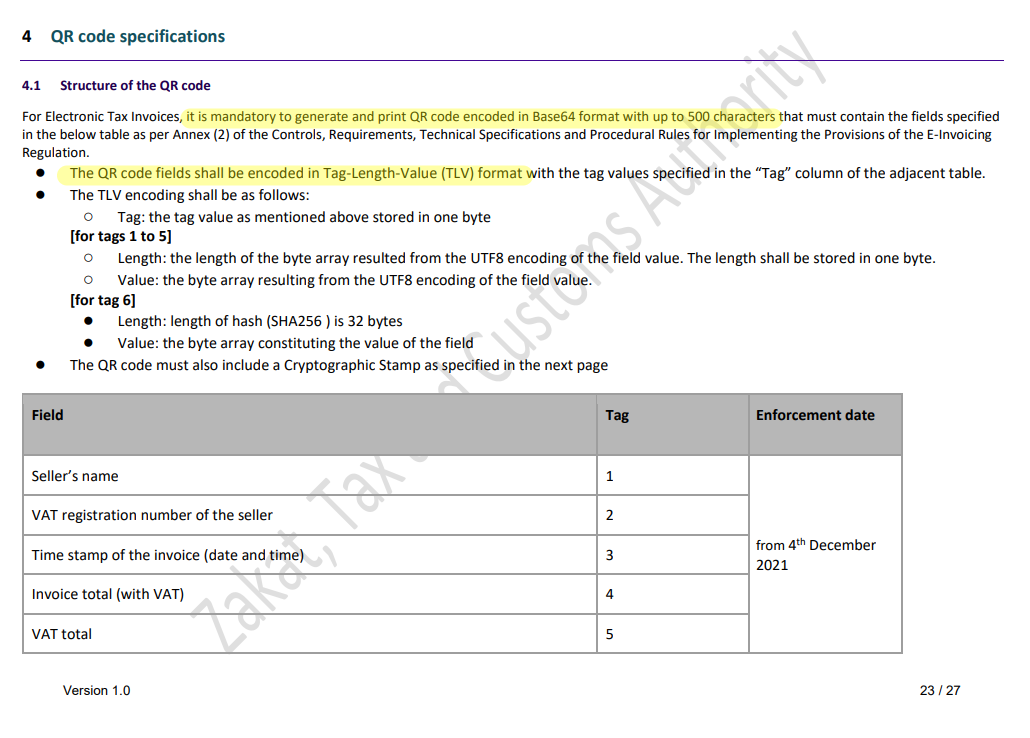
Thanks, Aronium team.
-

Hi There, For now, the QR code should generate Text Values like below. So can you put these information in Plain text, instead of putting hash code.
Seller Name:ENZ Apps
Seller Vat:300463850300003
Invoice Date:2021-10-18
VAT Total:150.0
Total Amount:1000.0I am attaching scan of an actual Invoice of a Random business in Saudi Arabia, who have implemented E Invoicing. Please scan this QR Code and see the sample information. I request Aronium team to work on it & make it like this.

-
Hi Merza,
We already had this discussion about Base64 above, and we had some discussion on support tickets, we would be happy to share what we know so far, but, before we do that, can you tell us are you saying that QR code should be in plain text based on the invoice you shared or based on official ZATCA documentation or instructions? If you have an official guidelines where ZATCA is saying that QR code must be in plain text and not Base64 encoded, can you share it with us?
Thanks, Aronium team.
-

Hello there,
Thanks for your fast response,
This link will show you the exact requirementshttps://zatca.gov.sa/en/E-Invoicing/SystemsDevelopers/Pages/E-Invoice-specifications.aspx
Download the xls file please
Best wishes
-
Hi Smsm Life,
Thanks for sharing the links, we have studied them long before applying for accreditation with ZATCA. Without going in too many details, if you look closer, Excel is actually saying that QR code must be encoded in Base64 value. Please see the second tab (sheet), row 19, column "x" and the QR code example (screenshot below).

Also, please see the official comment at the beginning of the page and follow the links carefully. You can see some comments above, too, but the documentation is pretty clear:
For Electronic Tax Invoices, it is mandatory to generate and print QR code encoded in Base64 format with up to 500 characters that must contain the fields specified
in the below table as per Annex (2) of the Controls, Requirements, Technical Specifications and Procedural Rules for Implementing the Provisions of the E-Invoicing
Regulation.Hope this removes any doubts you may have. Of course, if you believe we have missed something, feel free to share it with us, we will be happy to look into it.
Best regards, Aronium team.


Post is closed for comments.
Comments
71 comments