Import Arabic name product

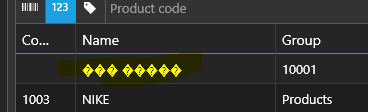
Importing products arabic name appear some other charecter, also please include duplicate product import option in file import.
-

Hi Ismail,
We believe your CSV file you used to import was already broken, and it may happen you didn't save CSV file as a Unicode, so the Arabic letters ended up like this.
If you are using Excel, you may need to specify what encoding to use when exporting the file. So, if you can see Arabic letters in Excel, please make sure to save CSV file in UTF-8 encoding, so your Arabic letters are saved as expected.
Alternatively, if you have troubles with this, I would suggest using Google Sheets, as they may be able to recognize and import and export CSV files automatically by using UTF-8, so you do not have the same issues as yo udo with Excel.
Hope this helps.
Thanks, Aronium team.
Please sign in to leave a comment.
Comments
2 comments