For Saudi Arabia e-invoice system

-

Hi Tariqul,
You can change this by yourself. All you need to do is go to Settings > Print options > Localize receipt text and enter "VAT" into the "Tax" label field, as described at https://help.aronium.com/hc/en-us/articles/360000493451-Localize-receipt-text.
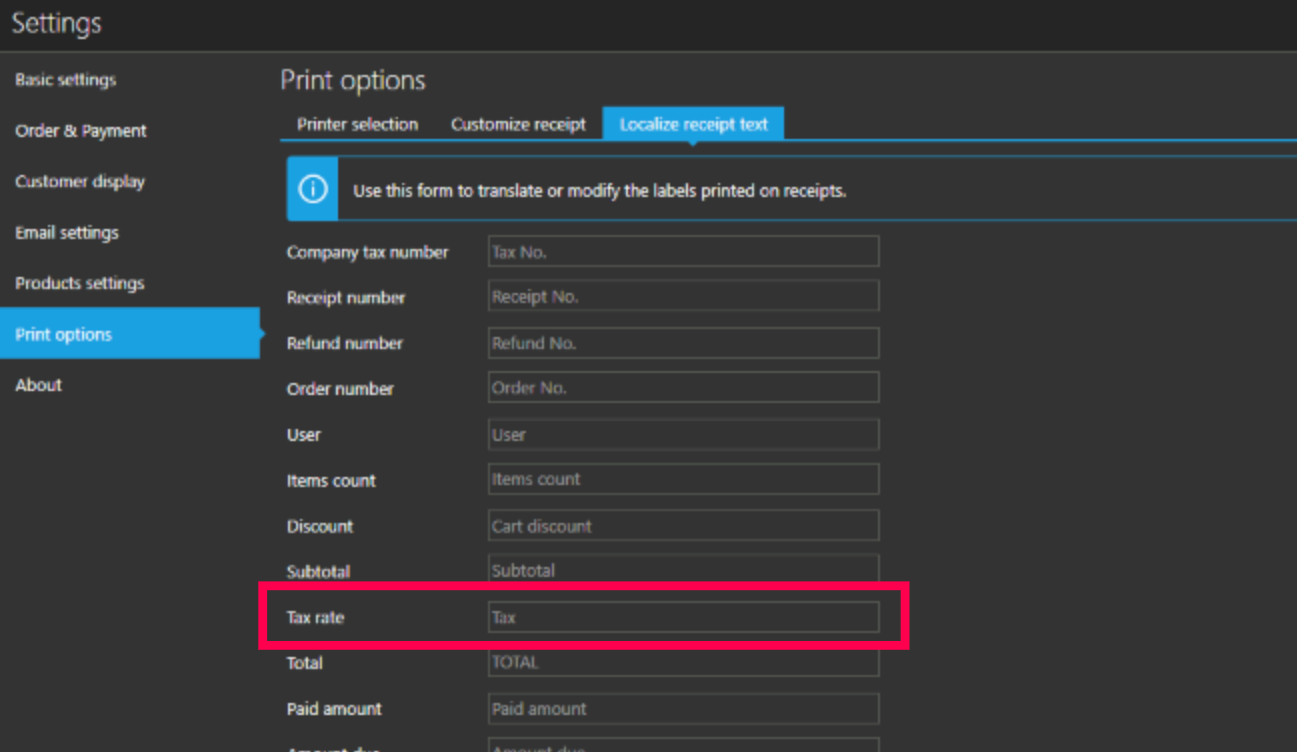
Additionally, if you wish to print tax rate name instead of "VAT", you can enable that in Settings > Print options > Customize receipt section by enabling "Print tax name" option, as described at https://help.aronium.com/hc/en-us/articles/115003418212-Customize-receipt, so you can use whatever works for you better.
Hope this helps.
Thanks, Aronium team.
-
Thanks aronium for reply.
Some improvements are very needed.
1. For e-invoice Security issues, Every invoice, permanently "readonly". Any one nothing doing edite or tempering 'super adminor saler.'
Super admin adlnd saler must be showing defrent visually effect.. For strong security functions. As an example saler account hide delete option, no add
products, price quantity.
Finaly. Some customers are monthly due. Customer payment monthly tottal due 599. Next month's he give 500.
Du payment 99.
how can I do it.Thanks aronium.
Please sign in to leave a comment.
Comments
2 comments