Addition of MRP for products
Completed
-
Official comment

MRP plugin is available for download at https://www.aronium.com/en/features/mrp.
Thanks, Aronium team.
Comment actions -
We were looking into an option to add the ability to assign MRP to a product, but we need to clarify the actual requirements.
One thing we need to confirm is how this MRP price would be used. Would it be enough to print product's MRP price in the receipt, as in the example below?
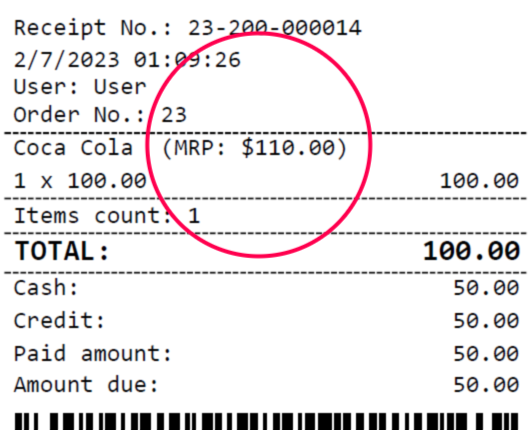
If printing MRP in receipt works for you, we would be happy to continue planning and hopefully deliver this functionality in the future.
Otherwise, if MRP should be used differently or elsewhere, or in case printing it in receipt is not enough, please provide some more details so we can understand the complete functionality better.
Thanks, Aronium team.
-
Hi Ragass 2022,
Thanks for the confirmation, much appreciated.
Regarding total saved amount, we are adding this "You saved: ___" to the receipt with version 1.39, and it will print total amount customer saved with a discount(s) applied to the sale, as in the example below.
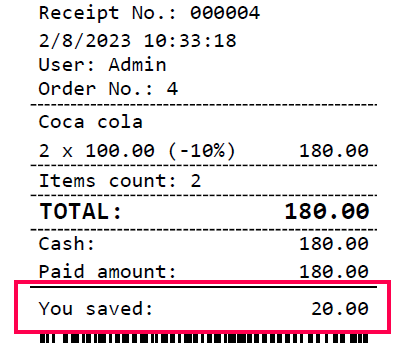
Can you please clarify should this MRP savings be combined together with the total discount or MRP savings should print separately?
-

Hello Team, this would be a nice add-on. Could you please add the same feature to price tags as well. When we are printing barcode, it should have MRP and Discounted Price on it preferably with option of Off % as well. Example: MRP 100 , Discount 20%, Offer Price 80. This would be really wonderful addition, currently we can only print price which doesn't emphasize on the discounts we are providing when customers are checking out products looking at bar code price tags. Let's make this people software better.
-
Hi everyone,
We just wanted to let you know that we have released the first version of our MRP plugin. You can download installer at https://www.aronium.com/en/features/mrp.
We wanted to thank you all for your patience and help, and we hope you will find this plugin useful for your business.
Thanks, Aronium team.


Please sign in to leave a comment.
Comments
8 comments