How a kitchen printer works

Comments

13 comments

  • Avatar
    Marcel

    https://help.aronium.com/hc/en-us/articles/360021868040?utm_source=web&utm_medium=plugin-page

    read and try to follow it must work

    0
    Comment actions Permalink
  • Avatar
    ابو عبدالرحمن

    Thanks Marcel
    I followed all the instructions and it didn't work

    0
    Comment actions Permalink
  • Avatar
    Aronium Support

    Hi ابو عبدالرحمن,

    Can you please provide some more information so we can understand what have you done so far? 

    The following screenshots (or any kind of info) would be really helpful:

    1. Print stations from Management - so we can see what Print stations you have set up
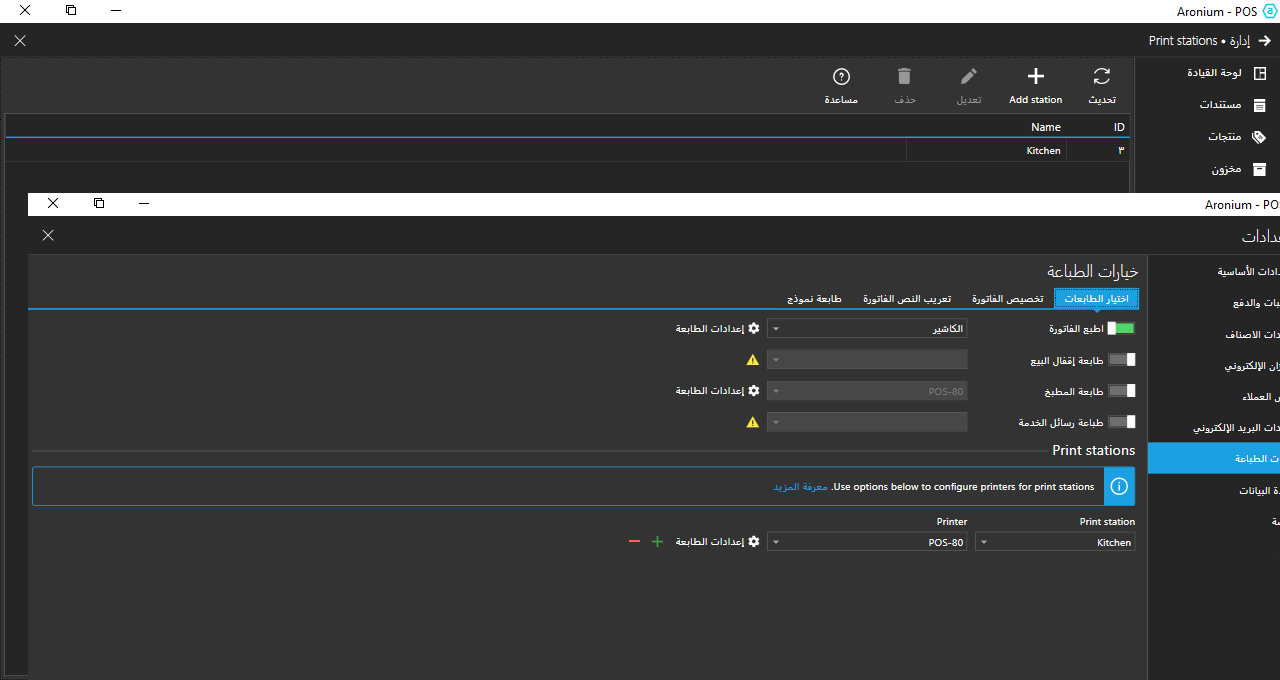
    2. Print stations in Print settings - so we can see that you have assigned printers to Print stations
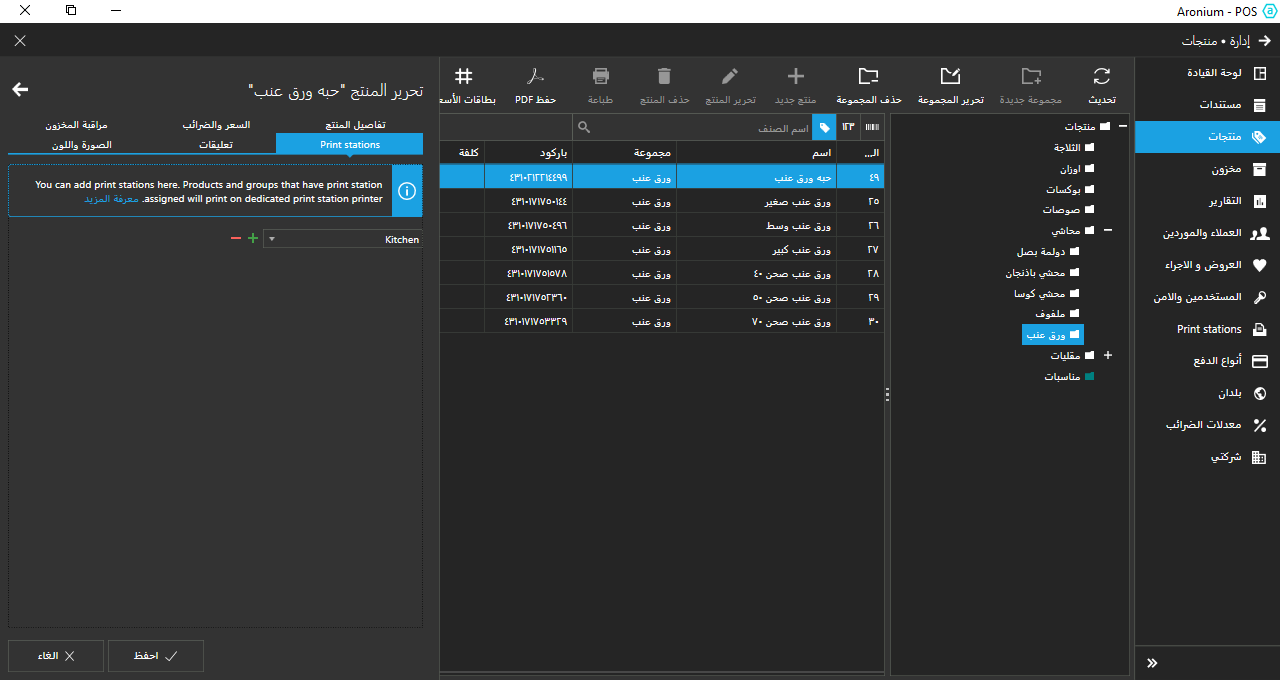
    3. Product's Print stations settings - so we can see how what print stations you have assigned to your products

    Thanks, Aronium team.

    0
    Comment actions Permalink
  • Avatar
    ابو عبدالرحمن

    Welcome Aronium

    1- Print stations you have set up


    2- assigned printers to Print stations


    3- Product Printer Stations


    I hope to find a solution to my problem

    0
    Comment actions Permalink
  • Avatar
    Aronium Support

    Thanks for sharing, everything looks fine. The next step would be to confirm that the printer is working as expected.

    Can you tell us, this "POS-80" printer, can you print a test page for that printer from this computer to confirm it is available and working as expected?

    Thanks, Aronium team.

    0
    Comment actions Permalink
  • Avatar
    ابو عبدالرحمن

    Good

    0
    Comment actions Permalink
  • Avatar
    Aronium Support

    We're sorry, but we are not sure how to understand "good" and it seems it doesn't answer our previous question.

    Did you manage to make Print stations work? If not, can you please confirm you can print a test page for that printer on this computer to confirm it is available and working as expected?

    Thanks, Aronium team.

    0
    Comment actions Permalink
  • Avatar
    ابو عبدالرحمن

    Hello

    I have a question ?
    Are the printers connected via a USB cable?
    or via a network cable

    I connected the cashier printer and the kitchen printer via a USB cable

    Is my method correct?

    0
    Comment actions Permalink
  • Avatar
    Marcel

    that is ok you can have multiple ones on usb


    if yout printer works by network that can also work or BT or wifi

    but you have to config them as a printer


    0
    Comment actions Permalink
  • Avatar
    ابو عبدالرحمن

    Thanks Marcel

    I have two printers
    The cashier printer works without problems
    Kitchen printer not printing orders

    0
    Comment actions Permalink
  • Avatar
    Marcel

    but if you go to settings can you print a test print on the the Kitchen printer ?

    0
    Comment actions Permalink
  • Avatar
    ابو عبدالرحمن

    yes

    0
    Comment actions Permalink
  • Avatar
    Moamen

    الغى زر الطباعة من اليمين الى اليسار وستعمل

    0
    Comment actions Permalink

Please sign in to leave a comment.