Retail/wholesale
Completed
I request for future updates whereby the system supports both retail and wholesale
-
Official comment

Hi everyone,
We are happy to announce that we have just released Multiple price lists plugin. You can use this plugin to create separate Retail and Wholesale price lists, assign different price lists to different cash registers (Aronium Pro) or assign a price list to a customer.
Please find more info and download at https://www.aronium.com/en/features/price-lists.
Thanks, Aronium team.
Comment actions -
Hi Dan,
For the wholesale, you can create sales document manually from management section. This gives you the option to print invoices instead of receipts and (from next update) keep track of paid and unpaid bills.
Sales documents created from management section behaves the same way as the ones created in retail (e.g. updating stock levels, ability to set payments etc.).
Also, creating the document from management gives you the option to set item sell price manually for each item, along with tax and discounts.
Is this something that you had in mind or there are some other requirements?
-
Creating a sales document from management is basically the same as creating a purchase (when you are buying goods and put them on stock). You can read more about this at https://help.aronium.com/hc/en-us/articles/115001095609-Purchase
The only difference in process is that you will select a sales category and the "200 - Sales" document instead of purchase.
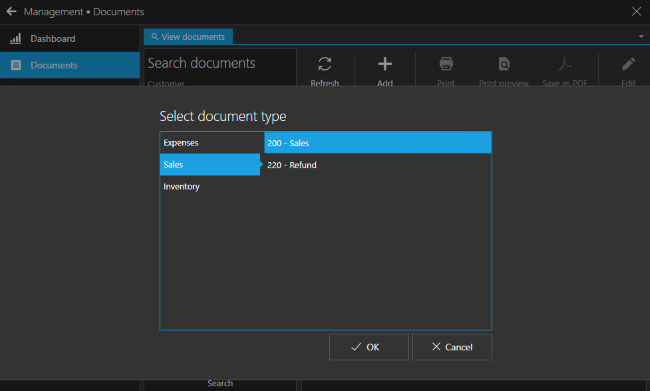
You can add whatever item you wish to sell and specify its price, so it doesn't matter what price is set for the retail, you can always overwrite that.
This way you can create documents outside of retail with ability to choose what price will be used for any item.
If you wish to track different payment (tender) types used for wholesale, you can create the ones you need, for example "Wire transfer" and use that payment type in documents. You can specify payment types in ""Payments" tab in that screen.
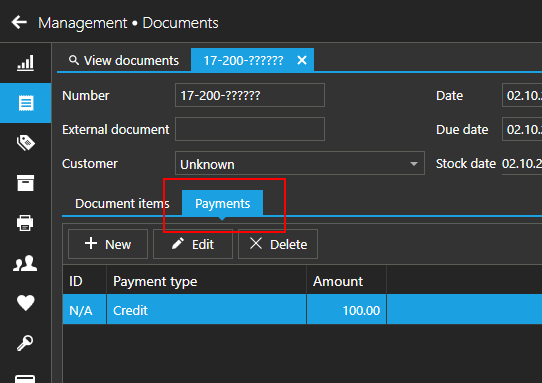
Specifying different payment types used for wholesale may be useful for reporting and tracking of such transactions in reporting later.
I hope this helps.


Please sign in to leave a comment.
Comments
8 comments