CREDIT SALES

Hello
I am doing some tests but I can not find the option if for example a customer owns credit purchases, for example it is used a lot in the restaurants that have service for companies which they sell day by day and the customer pays at the end of the week, there is some way to be able to make this sale on credit to then be able to search in reports, those bills that are unpaid .-
Best regards. Enrique
-

Hi Enrique,
Please, read this article, it describes the process and requirements for credit purchase.
https://help.aronium.com/hc/en-us/articles/115001968912-Credit-payments
-
You can always add another payment to a document (transaction). Here is the example:
- Customer buys something for $100, but pays only $50
- $50 is cash payment, other $50 is a "credit" payment
- Customers comes and brings $25
- You can update the transaction (document) by changing previous credit of $50 to $25, and add new payment of $25 int cash
So, you can update payments whenever you wish, that will result in correct reports and you can keep track of unpaid transactions. The only requirement is, once payments are set, payments total must match document total
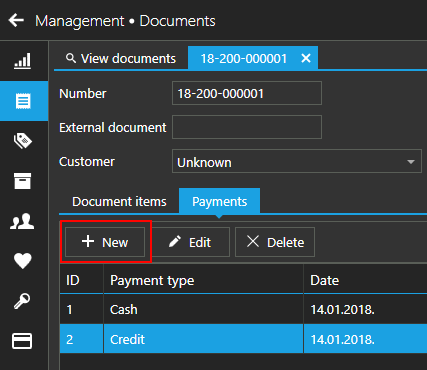
I hope this helps.
-
Hi Gigi,
You don't, but it depends on your payment types.
If payment type used for sale has "Mark transaction as paid" turned ON, sale will be marked as "Paid". Otherwise, if any of payment types used for transactions has "Mark transaction as paid" turned OFF, sale will be marked "Unpaid".
Please, check your payment types if they have this option turned on or off. You can find more info at https://help.aronium.com/hc/en-us/articles/209548569-Payment-types.
Hope this helps.
Thanks, Aronium team.
-

If payment type used for sale has "Mark transaction as paid" turned ON, sale will be marked as "Paid". - this one works only to first payment. I would like to see for the invoice however, to be automatically tagged as "paid" if the customer returns with 2nd payment /full payment without switching the "paid/unpaid" manually.
Please sign in to leave a comment.
Comments
6 comments