I want to get the final payment to round
Completed
-
Official comment

Hi everyone,
We are pleased to announce that rounding functionality is now available in Aronium under Payment type options. You will be able to specify rounding rules for each payment type you wish to be rounded.
Read more at https://help.aronium.com/hc/en-us/articles/209548569-Payment-types#h_01KX4JQEWHJYWYJG5MZNCBDJ37.
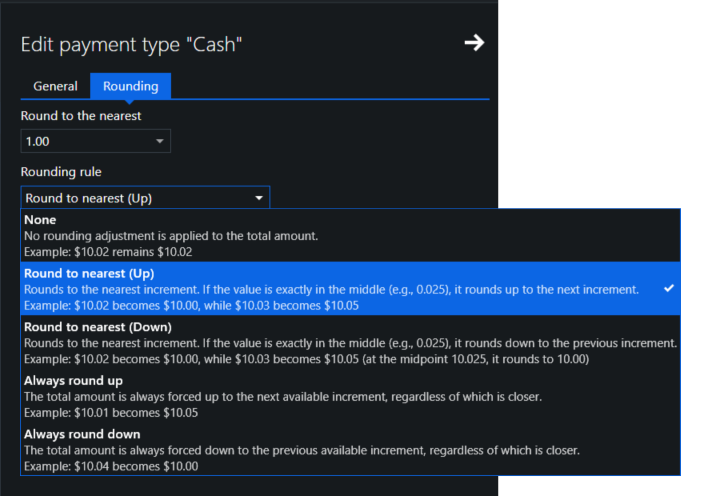
Please download the latest update (1.50+) and try it out.
Best regards, Aronium team.
Comment actions -

Hi, rounding is important to me too. In many countries, low value coins have been eliminated so rounding is required as part of a cash tendering process.
In Australia, the lowest value coin is 5 cents so for a transaction of $1.73 the amount required is $1.75 as this rounds up to the nearest 5c value and from a $2 coin, you would give 25 cents change.
For a transaction of $1.72, you round down to $1.70 and would give 30 cents change for the tendering of a $2 coin.
-
Hi Aslam,
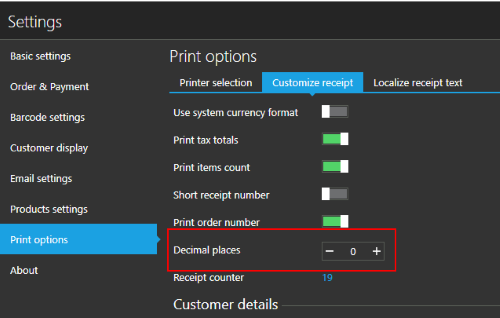
You have the ability to completely remove decimal places (round to even number .00) by entering "0" in number of decimal places, as described here.
This way, your receipt will be printed without any decimals, as you suggested in your example.
Rounding down
Regarding other users question, unfortunately, there is no easy way to round to equal decimal (e.g. 1.72 -> 1.70), but I believe it can be done using custom receipt template. as a workaround.
We could probably create a custom receipt template that would take care of this rounding, but this means that the receipt total will still be 1.72, but receipt would print 1.70.
@Peter, @Martin, can you please confirm if this works for you?
-
Thanks for the reply and I will have a look at that but it does not really solve the problem. There are several issues:
1. The amount of cash on hand cannot be reconciled with what's in the til.
2. Rounding only applies to cash transactions.
3. Values need to be rounded up or down to the closest multiple. For example, $1.72 needs to be rounded to $1.70 but $1.73 needs to be rounded to $1.75.
One way around it would be to ensure all pricing is in multiples of 5 cents. Now this would suit fine as we use multiples of 20 cents. But then there is an issue when applying discounts where you get values that are not multiples of 5.
I expect using scales and weight-based price calculations would be a problem too.
-
Hi Everyone,
We have run some quick test to see what needs to be changed and how would this affect application in general.
When using rounded prices without discount with round quantities, it is fine, of course, but the questions are raised when discounts or non-round quantities are applied, as Peter suggested in previous post.
So, there are some question we had and we would like you to help us understand the problem better and how it is handled in your country following your country regulations.
EXAMPLE 1 (Discounts)
In this example, we have applied some silly discounts, just to see how does it reflects receipt printed.
As you can see, there are differences in "Subtotal" and "Total" fields, as even the price was rounded to $0.05, after discount it ends up as $1.52.What we understood after these tests is that we cannot round item totals, as it would lead to big differences in tax amounts and total itself. Instead, the idea was to have it round for easier change return, so the total does ends up rounded to $0.05.
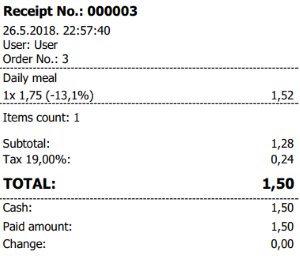
Can you tell us if this receipt is OK or what is wrong with it? Should item total be rounded in this example or not, and, if it does, how would this affect tax calculation as item price / total is not finally rounded to $0.05 due to discount?
EXAMPLE 2 (Quantity)
In second example, we have put some weird quantity, as it may happen in case you are using weighing scales.
The result was the same as with the previous example, where item's total was not rounded, while "Subtotal + Tax" amount may be different in some cases, depending on specified quantity and resulting item total.
CONCERNS
The biggest concern we have with rounding item prices / totals is that it may end up in big differences if there is many items in receipt. For example, if we assume that the rounding will happen +-0.02 (to finally round to 0.05 up or down), this may lead to difference in $2 on 100 item's receipt. This will lead to different tax calculation it it just doesn't seems right.
If we understood correctly, the idea is to have change returned to customer easily, avoiding returning anything else then $0.05.
SUMMARY
Can someone please answer / explain the following:
- What happens with items total in case quantity or discount (results in non-round value)? Should item total be rounded to $0.05 (or any other specified) in above example?
- How the tax is calculated, based on rounded values or regularly calculated item's total (not rounded)? If we need to "round" it, can someone please provide an example?
- Is it OK to round the "TOTAL" amount only without rounding other amounts in receipt / invoice?
- If answer is yes: is it OK that "Subtotal + Tax" amount are different then "Total" amount (as only total is rounded to e.g. $0.05)?
- If answer is no: can someone provide an example with item, subtotal, tax and total amounts?
Thanks, Aronium team.
-
I have reviewed the example a couple of times and it looks fine. One thing that would be nice (and what our cash register does), is keep a track of cumulative rounding adjustments.
As rounding is both up and down, the more transactions you have, the less significant your rounding adjustment will be. Looking at our cash register reports for previous trading days gives the following:
1. Cash in Drawer transactions: 100
Cash in Drawer $1507.90
Rounding total transactions: 60
Amount: -0.092. Cash in Drawer transactions: 98
Cash in Drawer $1465.55
Rounding total transactions: 57
Amount: -0.023. Cash in Drawer transactions: 99
Cash in Drawer $1399.55
Rounding total transactions: 67
Amount: -0.064. Cash in Drawer transactions: 112
Cash in Drawer $1783.65
Rounding total transactions: 73
Amount: 0.00Looking back over the last 8 months of transactions, the biggest daily rounding adjustment was -0.15 negative and 0.11 positive.
I cannot comment on the tax side as operating a charity under a very specific set of conditions, our sales are generally tax exempt and any tax matters I leave to our accountant. If the system can keep a track of rounding errors, your accounting software could always count rounding adjustments as an expense so the figures add up precisely.
-
Hi Peter,
Thank you for the response.
Keeping track of rounding adjustment is something we had in mind, so, if this gets implemented, we will store rounding adjustment, for sure, so it can be used later in reporting, if required.
One more question, does rounding adjustment needs to be printed on receipt / invoice?
Also, to speed things up, if you wish, we can prepare a custom receipt template for you, but without keeping track of rounding adjustment at this moment, until it is fully implemented.
We can calculate rounding in receipt template directly (if you are using "POS 58" or "POS 80" printer type), so the receipt looks like the one in example above.
If this works for you, please let us know so we can proceed with that.Thanks, Aronium team.
-
Not currently set up for receipt printing - still looking at implementation of the POS system to replace cash registers and will deal with that later. Most of our transactions don't require receipt printing anyway.
For invoices - ours would normally be our accounting software (Manager) and payment is via bank deposit or if in cash, would never need rounding.
-

In Netherlands we don't have the 1 and 2 cent euro coins.
If we pay with bank transfer there is no rounding. When the total is 5,02 the charge on the debt card will be 5,02
We only round the change .
Example one
Subtotal 4,00
Tax 21% 0,84
Total 4,84
Paid amount 10,00
Change 5,15
Example two
Subtotal 4,15
Tax 21% 0,87
Total 5,02
Paid amount 10,00
Change 5,00
When total is:
5,01 and 5,02 the cash total to pay will be 5,00
5,03 and 5,04 the cash total to pay will be 5,05
5,06 and 5,07 the cash total to pay will be 5,05
5,08 and 5,09 the cash total to pay will be 5,10
With kind regards,
Martin
-

i need this too for Canada, as in Canada they removed pennies.
See link for Canada requirements: https://www.canada.ca/en/revenue-agency/programs/about-canada-revenue-agency-cra/phasing-penny.html
If the customer chooses to pay by cheque, credit card or debit card, no rounding is applied. However, if the customer pays with cash, the final total is rounded.
Rounding should only be used on the total amount charged after the calculation of any applicable duties or taxes such as the Goods and Services Tax.
Having rounding adjustment on receipt/invoice would be nice. I see some receipt here that have it.
-
Hi Sasha,
You can implement part of this by using "Split payments". No discount can be automatically applied as you suggested, but you can name that payment type the way you want, so it appears descriptive in receipt.
You can find instructions how to split payments (use multiple payment types) at https://help.aronium.com/hc/en-us/articles/209524645-Payment#split
Hope this helps.
Thanks, Aronium team.
-

https://help.aronium.com/hc/en-us/community/posts/360006625212/comments/360002023112
i need this for Malaysia.. we dont have 1 cent coins.
-

This is not issue.
For example. Some table got 347$ bill after some discount it gets to 332.7$.
I want to give some extra% discount, that table will pay only 330$, but I couldn't make a quick math, how much % of the discount, should i give on the bill.
but if I put in the payment option 100$ by visa 150$ by check and rest 80$ by cash. on cash there should be option when I enter 80$ and there still 2.7$ of the bill, if there will be another button "round cash" it will giwe automatically another disount of 2.7$ on the bill.
totally in the register income 330, when only 80$ by cash. the discount van be printed on the recipe.
because, if there exchange between cash in register and recipies printed more than 0.5$ it could be a problem with TAX authorities if they come with a surprise review. -

I really need a solution to this rounding problem. I live in New Zealand, our smallest unit of currency is 10c piece. Prices however are generally set as $9.99 or $9.95 for example, and both of those round to $10 in cash. $9.94, however, would round to $9.90. It's called Swedish rounding, and is in place across the whole country. So you can imagine when discounts are applied, this just doesn't work with Aronium. I see this was requested 1 year ago, do you have some sort of solution? If not I may have to begrudgingly use another program.
-
Hi Chris,
Let's move this to support ticket so we can discuss the details there.g
If it works for you to have numbers rounded in receipt only, without changing the amounts in actual documents and reports, we would be glad to help and try to make custom receipt template for you.
Thanks, Aronium team.
-

Hello
Has this been resolved? If so where can I find the information?
In Canada, when customers paying in cash, since the smallest coin is 5c, it needs to round up or down.So it is like 2.22 would be 2.20, while 2.23 would be 2.25. Only for cash transactions. Thank you.
Please provide an update. -

Yes it would be best if the rounding off option is added. This can be introduced as a separate plugin/tool just like "Named Order". An excellent addition to it would be if we can configure the rounding option with rounding up, rounding down, round off decimals, round off whole numbers, rounding off to the nearest 10,100 and so on. Also an option to enable/disable print rounding adjustments on receipt
For Example:
Round up:
- After discount or Total sale: $56.45 to $56.50
Round down:
- After discount or Total sale: $56.45 to $56.40
Round off to the nearest 10th decimal:
- After discount or Total sale: $56.45 to $56.50
Round off to the nearest 10s whole number:
- After discount or Total sale: $56.45 to $60
-

We have the receipt.frx fix, which is now giving an error of the receipt template.
You can find "Receipt. frx" attached to this message; in order to replace the default template, please, follow the instructions below.
Instructions
To include this template for printing, do the following:
Open a location where Aeonium is installed, by default it should be located at C:\Program Files\Aronium
From there, open "Templates" directory
Inside "Templates" directory create new folder, name it "user" (this is important, as Aronium will look for receipt template there first, so it must be named like that exactly)
Once you have created "user" directory, copy "Receipt.frx" attached to this message into that directory
Restart Aronium to make sure new receipt template is loaded
At the end, path where you copied this "Receipt.frx" should be:
C:\Program Files\Aronium\Templates\user\Receipt.frx
Directory structure should be like in the screenshot below:
Once you have "Receipt.frx" template in this directory, try printing any receipt, this template should be used.
This no longer works. Can we get an update on this?
-

Buenos días, quisiera saber si se obtuvo alguna solución respondiente al sistema de redondeo ya que yo necesitaría una opción como el que plantea el señor "Zamad Anwar Abbasi" ya que en Argentina la moneda se redondea y ya no se utilizan los centavos por su valor tan bajo, mi problema radica en que la balanza emite un ticket y el mismo puede ser leído por Aronium de forma correcta y precisa lo cual es muy bueno, pero no redondea el numero que lee sino que emite el total con todos los decimales y eso genera que el monto final no este redondeado, por lo tanto lo estoy colocando de forma manual al monto total. ¿podría haber alguna solución u opción al formato y sistema de redondeo que aun no esta implementado que fuera para cada producto unitario y para la lectura de códigos de barra por balanza? muchísimas gracias.
Estoy a disposición para cualquier tipo de discusión o planteo para la solución de este inconveniente.


Please sign in to leave a comment.
Comments
36 comments