Allow selecting multiple products and groups in Reporting and Price Tags

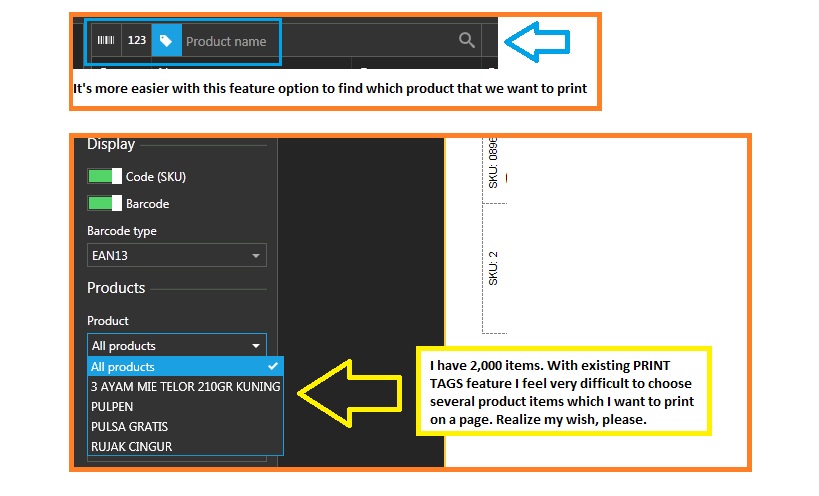
Currently when creating reports or price tags you can select either "All Products" or a single product. I would like to be able to select multiple products and/or product groups, like you can do when creating promotions. So instead of a dropdown, there is a button that opens a popup allowing selection of any number of products and groups.
A follow on from this would be the ability to save report filters to easily reuse them, effectively creating custom reports. Perhaps add a "Saved Filters" section underneath the current filter options.
Usage example:
At the end of each day I would like a report of sales on a particular group of items (eg. All Newspapers). I would like to be able to do something like: Management -> Reporting -> Sales - Products -> Saved Filter "Newspapers" -> Print.
The ability to select multiple products/groups would also be useful for printing price tags as currently both options waste a load of paper. (Print all tags, or one tag per page)
For example: I start stocking 30 new items and need to print price tags for them, I would like to select just the new products and print the tags all in one go, rather than one at a time.
-
Official comment

Ability to search and select multiple products for price labels is available with version 1.33.
We are still missing the ability to select groups only, but we hope that having an option to select multiple products will be helpful for the start.You can find updated instructions at https://help.aronium.com/hc/en-us/articles/360002593772-Print-product-price-tags.
Thanks, Aronium team.
Comment actions -

I get a few products with Bar Codes already on the item which I use on Aronium.
However, I get / have a lot of products that do not have bar codes.
And to print a bar code via the Aronium system doesn't work.
1. if you pick 1 product, it always places it in the top left corner of the label / A4 page.
2. There is no way that I can see to pick multiple products from the list. Its either One item or All items.
- is it possible to be able to pick any or multiple items from the Bar Code Product list using maybe the Shift Key which will in turn add to a page of labels.?
Currently I have to pick one. Save it to a word document, open that doc, then copy and paste it to another template on word ( mine are Avery Label templates ) and print from there.
This is tedious and long.
Being able to select a page lot at a time (of a random selection ) and set the format of the Save file to match another template would be much faster.
So the first priority would be to be able pick multiple items so I can then copy and paste to my templateThis would help a great deal and make at lease one part of the process faster.
Any ideas on this please
Thanks




Please sign in to leave a comment.
Comments
12 comments