Cannot find receipt setting to show tax description instead of ‘Tax’

Hey all,
1. Have created ‘Tax’ item know as ‘Service charge”;
2. On receipt, shown as ‘Tax’ but I need the exact tax ‘Service charge”;
3. Cannot find receipt setting to customise.
-

@Yao, thank you for providing a correct answer.
@Kelvin, you have replied to "noreply" email, it ends up in some kind of "limbo" and doesn't shows up here. Your question was:
"Hi Yao Fahi, How do I access "Settings"? I cannot find it under "Management". Thanks and regards, Kelvin"
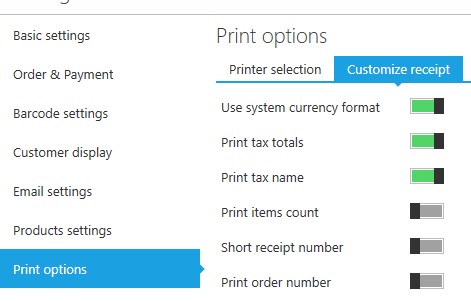
Print receipt settings are not under "Management" section, you need to look for application settings, as described at https://help.aronium.com/hc/en-us/articles/208663269-General, there you can see how to access "Settings".
From there, follow instructions at https://help.aronium.com/hc/en-us/articles/209393985-Print-options to find "Customize receipt" section.
Hope this helps. If you still have troubles accessing settings and setting up "Print tax name" option, please let us know.
Thanks, Aronium team.

Please sign in to leave a comment.
Comments
2 comments