Locked Sale Print Showing 2 Decimals Only

Hi, we have setup 3 decimals in program and they are printing and displaying fine in Print Receipt and Kitchen Print. Today I enabled the PRINT LOCKED SALE, but it is printing only two decimals instead of 3.
Sale is recorded with 3 decimals in system but locked sale print showing only 2 decimals. How can this be fixed?
-

Hi Taim,
Locked sale print is using Windows regional settings for number of decimal places. What you need to do is to change number of decimal places, as in the screenshot below. You can access these Windows settings if you follow instructions at https://help.aronium.com/hc/en-us/articles/115002880512-Currency-symbol.
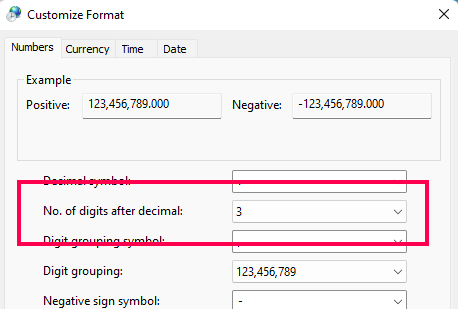
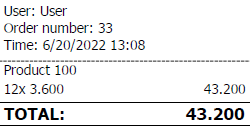
Once you do that, restart Aronium and try printing locked sale, it should have 3 decimal places as expected.
Thanks, Aronium team.
-
If you had Windows regional settings set to 3 decimals before, next time you run (or restart) Aronium should ensure that the correct settings are used.
Please let us know if this worked out for you as expected or you still have issues after following the previous instructions.
Thanks, Aronium team.
Please sign in to leave a comment.
Comments
4 comments