promotion on quantity
Answered
Aronium 1.38.2.0 , promotion basis quantity not working with this update.Kindly check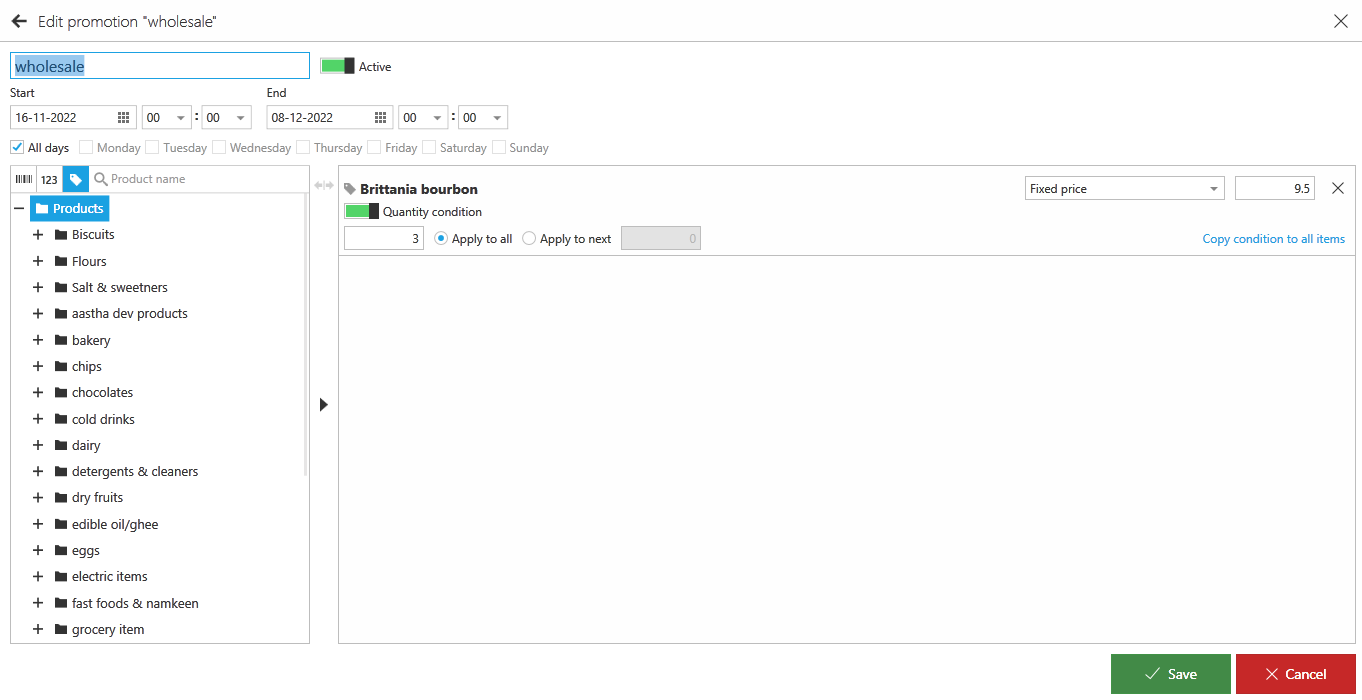

-

Hi G SP,
There is a use-case where promotions are not triggered. Promotion will not be triggered if you add 1 to the sale and then change to e.g. 4.
As this is the only way we can reproduce this behavior, we believe that was the case. Can you try these two ways of adding items to the sale, just to check if promotion is triggered.1. Add products one by one to the sale
If your promotion has "Quantity condition" set to 3, it will be triggered on 4th item (after that quantity you have entered). Try adding one by one 4 times, promotion should be triggered on 4th item.
2. Setting quantity before you add item to the sale
As described in "Changing the quantity" article, instead of editing the quantity of already added item, you can do the following:
- Press "Quantity" button (of "F4" key)
- Enter 4 for quantity (or anything that is above quantity condition set in promotion, in our case quantity condition is 3, so anything above that will work)
- This will set quantity for the next product that is going to be added to the sale
- Add promoted item - promotion should be trigerred
Hope this helps.
Thanks, Aronium team.
-

Yes the two other ways (1. Add products one by one to the sale & 2. Setting quantity before you add item to the sale) works fine but the most common use case is where users tend to select the item name first and then change the quantity i.e the use case where Promotion are not be triggered if you select item first (which by default add 1) to the sale and then we change quantity to e.g. 4.
Is this being worked upon to be fixed, to get it working even if the quantity is changed later, in next release?
or this is de-prioritized?
Please sign in to leave a comment.
Comments
2 comments