How to make print receipt to only print once

Hi aronium team
As in my field of business it is necessary for the cashier to print ONLY ONCE every transaction. How to disable the print receipt from printing multiple times. Meaning each transaction can only has 1 printed receipt.
Thank you
-

Hi Luvy,
Unfortunately, there is no such option, but you may be able to achieve something similar by tweaking the settings and setting up some permissions.
Prevent receipt reprint from sales history
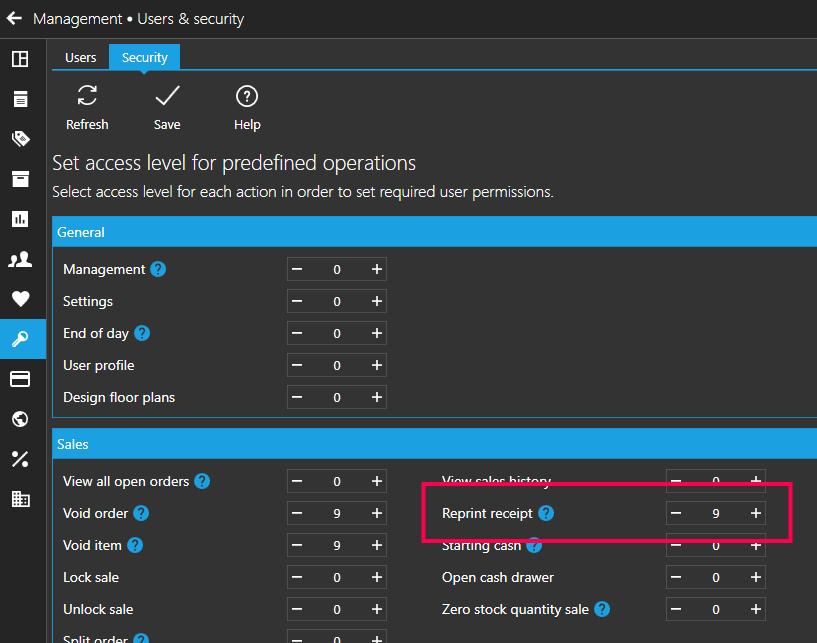
First, you can prevent printing receipt copies from Sales history by setting a security level on Reprint receipt action, as in the screenshot below, If set correctly, only users with this access level will be able to reprint receipt. You can read more about setting up access levels here.
Hide print receipt screen
Next, you can turn Display receipt print dialog option OFF in Settings > Order and payment, as described here. With this option turned off, receipts will be automatically printed and users will not be able to print multiple copies directly after the sale. However, if you are using this screen for other operations like sending invoice / receipt via email, that functionality will not be available anymore, as the screen will not appear after the sale.
Hope this helps.
Thanks, Aronium team.
Please sign in to leave a comment.
Comments
2 comments