Auto Search by Bar Code or Product Name
Completed
If you can differentiate the input through machine language, which is coming from whether keyboard or barcode reader you may automatically change the search option to bar codes or to product names in sales screen. This will reduce time considerably.
If we are specific to search by product codes we can manually select Product Code Search.
If you feel this technique will work, you may consider.
Thanks for offering a great product !! Regards to all at Aronium.
-
Official comment

Possible duplicates:
Comment actions -
Thanks for the feature request.
We have discussed "wild card search" previously, where you can search by any of three options at the same time. Other users are asking for this, too, but it is not scheduled for development yet. We'll keep this one here and will update this thread if or when we accept and plan this.
-

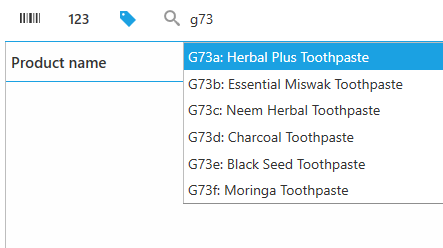
Please add this wild card search in future. It will make it very helpful. We had to duplicate code field with name & barcode to get similar results or at least reduce the switching between 3 modes to 2. Name search is much easier as you can see partial results while typing the code # and it isn't case sensitive:
-
Wildcard search is available with version 1.40, allowing you to search products by name, code (SKU) or barcode at the same time. Learn more at https://help.aronium.com/hc/en-us/articles/208766849-Workspace.
Thanks, Aronium team.

Please sign in to leave a comment.
Comments
8 comments