Cannot accept partial payment from added customer
Answered
-

Hi Ronnie,
Please see https://help.aronium.com/hc/en-us/articles/115001968912-Credit-payments, you will find instructions on how to handle partial payments there.
Hope this helps.
Thanks, Aronium team.
-
My question was, for example
I have a customer who is buying a gold chain for $100. They’re asking me if I can put that aside. And they give me $50 deposit. OK now I add them as a customer then I make a sale invoice for $100 but when I try to apply $50 deposit it gives me an error message saying that I have to accept the full payment. I cannot apply $50 deposit as a partial payment and leave the balance is $50. -
Hi Ronnie,
Please read https://help.aronium.com/hc/en-us/articles/115001968912-Credit-payments carefully, it may be a bit complicated but it contains all the necessary information on how to record a partial payment. The very beginning describes how to add and set up new payment type that will have to be selected for the remaining amount ($50 in your example, along with $50 in cash).
If you are creating a sale from cash register (recommended), you can find step-by-step instructions in Making a credit sale section. Otherwise, if you are creating a sale document from the Management section, refer to Update payments section of that article for instructions on how to add payments to the document.
Hope this helps.
Thanks, Aronium team.
-
Hi Ronnie,
As mentioned before, you need to 1) create a credit payment type by following instructions here and 2) use that credit payment type for the remaining unpaid amount, as in the screenshot below.
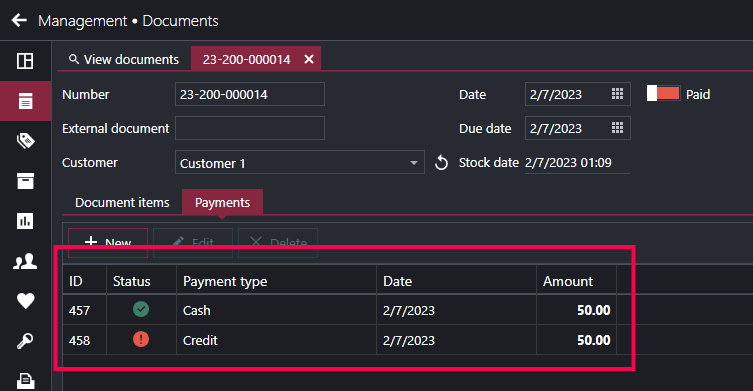
Once you have total amount of $100 added to the document payments ($50 in cash and $50 in that new credit payment type) you will be able to save the document and, if you set the payment type correctly, you will be able to track the unpaid amounts in the reporting section (explained at the bottom of previously mentioned help article).
Hope this helps.
Thanks, Aronium team.
Please sign in to leave a comment.
Comments
6 comments